Discord has no text-alignment feature, so centring is done by padding a line with spacing characters until it sits where you want it. Discord’s own formatting reference lists bold, italic, underline, strikethrough, code blocks and subtext, and alignment appears in none of them. Three separate alignment requests sit unanswered in Discord’s community forum, the oldest opened in 2021. The workaround works, within limits this page measures: of the nine spacing characters people recommend for it, only two are reliably wider than an ordinary space (U+2800 at 2.46 times and U+3000 at 3.67 times), three have no width at all, and a run of ordinary spaces collapses to a single space on any client that renders text the way a browser does. Padding is measured in pixels, so a line centred on a desktop window is not centred on a phone.
What text formatting does Discord actually support?
Discord supports six text transformations, all of them character-level rather than layout-level. Its formatting reference, Markdown Text 101 (Chat Formatting: Bold, Italic, Underline), documents the full set: bold, italic, underline, strikethrough, inline code, code blocks and subtext. Every one of them changes how characters look. None of them moves a line across the message column, which is why no combination of them produces centred text.
| Syntax | Result | Changes position? |
|---|---|---|
**text** |
Bold | No |
*text* |
Italic | No |
__text__ |
Underline | No |
~~text~~ |
Strikethrough | No |
`text` |
Inline code | No |
```text``` |
Code block | Preserves spacing, so padding survives |
-# text |
Subtext | No |
The code block is the one row that matters for alignment, because it preserves whitespace instead of collapsing it. That difference decides which padding method survives, and it is the reason the next section’s measurement produces two different answers on the same platform.
Why does spamming the spacebar fail to centre anything?
Consecutive ordinary spaces collapse into one space wherever text renders with normal whitespace handling, so ten spacebar presses produce the width of a single space. The top-voted answer on the Reddit thread ranking second for this question: “Short answer: Not really possible. Well, you can hit a crap ton of space bars”: describes a method that fails on exactly the client most people read Discord in. We measured both cases in Chromium at a 16-pixel font size: ten U+0020 spaces rendered 4.5 pixels wide once collapsed, while ten no-break spaces rendered 44.5 pixels, a difference of ten times from characters that look identical when you type them.
That measurement explains the pattern every server admin runs into: padding that looked correct while typing loses its indentation once the message posts. The character survives; its width does not. Choosing a character that resists collapsing is therefore the first decision, and the widths differ more than the recommendations admit.
Which character should you pad with?
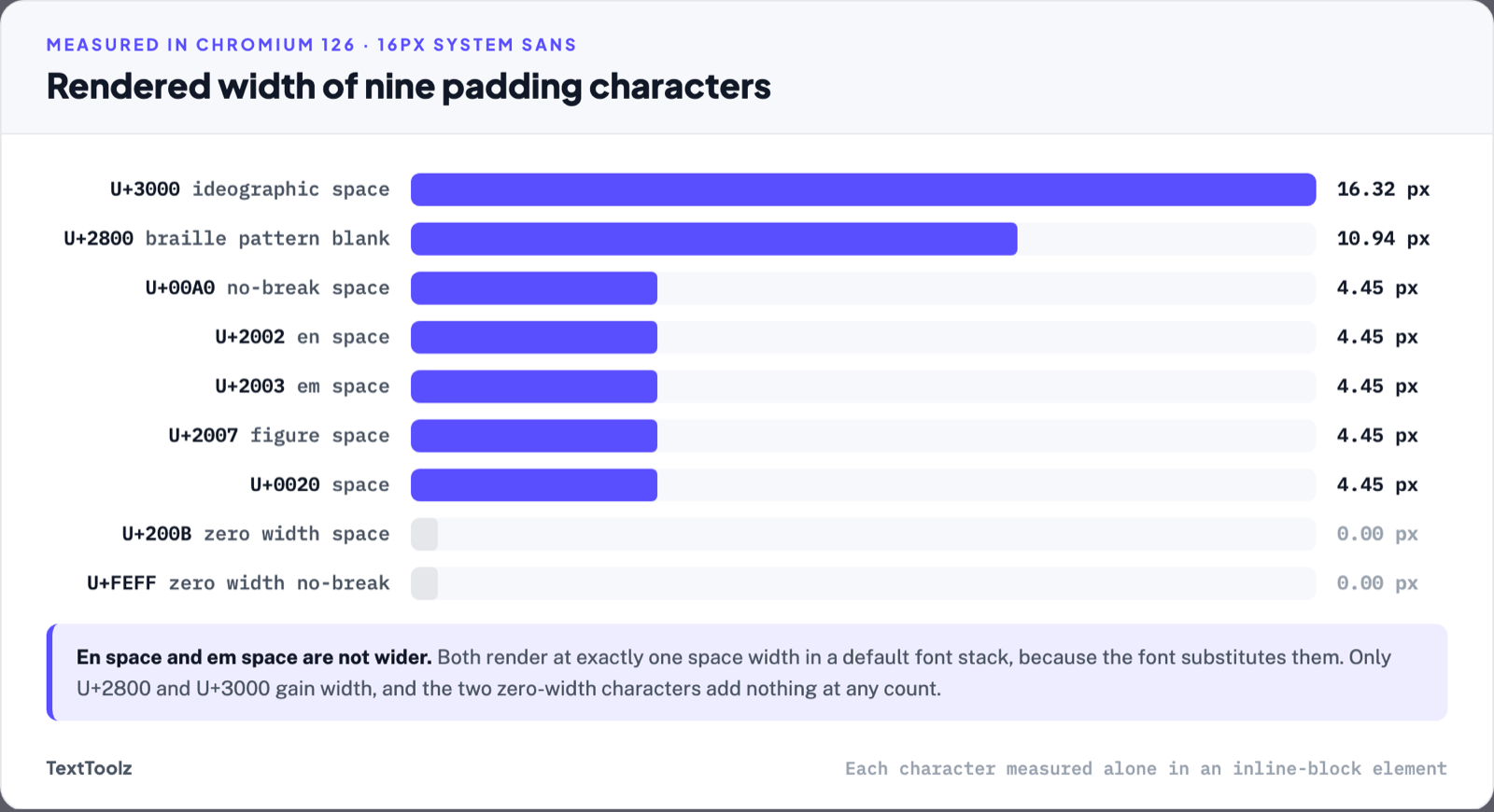
Pad with U+2800 BRAILLE PATTERN BLANK or U+3000 IDEOGRAPHIC SPACE, the only two characters in common circulation that render meaningfully wider than an ordinary space. The table below reports every character measured, its width at a 16-pixel font size, its width relative to an ordinary space, and whether a run of it survives whitespace collapsing. Two results contradict the advice repeated across font and symbol sites: EN SPACE and EM SPACE are not wider in a default system font stack, because the font substitutes them, and the two zero-width characters add nothing at any count.
| Codepoint | Name | Width | Versus a space | Survives collapsing |
|---|---|---|---|---|
| U+0020 | Space | 4.45 px | ×1.00 | No |
| U+00A0 | No-break space | 4.45 px | ×1.00 | Yes |
| U+2002 | En space | 4.45 px | ×1.00 | Yes |
| U+2003 | Em space | 4.45 px | ×1.00 | Yes |
| U+2007 | Figure space | 4.45 px | ×1.00 | Yes |
| U+200B | Zero width space | 0 px | ×0 | No |
| U+2800 | Braille pattern blank | 10.94 px | ×2.46 | Yes |
| U+3000 | Ideographic space | 16.32 px | ×3.67 | Yes |
| U+FEFF | Zero width no-break space | 0 px | ×0 | No |
These figures come from a browser, not from Discord’s desktop application, which ships its own font. The ratios hold wherever the glyph exists in the reader’s font, and the collapsing behaviour belongs to the renderer rather than to the font, so it applies anywhere text is laid out the way a browser lays it out. Copy the characters themselves from the blank space generator, which outputs each one as a single copyable unit, and pad in front of the line rather than around it: a leading run gives the same visual result with half the characters.
How do you centre a Discord profile bio?
A bio centres the same way a message does, with a different width to aim at. The profile panel is narrower than the message column and narrower again in the mobile app, so the padding count that centres a bio on desktop over-indents it on a phone. Count the characters against the surface you expect people to read it on, and accept that the other surface renders it approximately.
Why does centred text break on a phone?
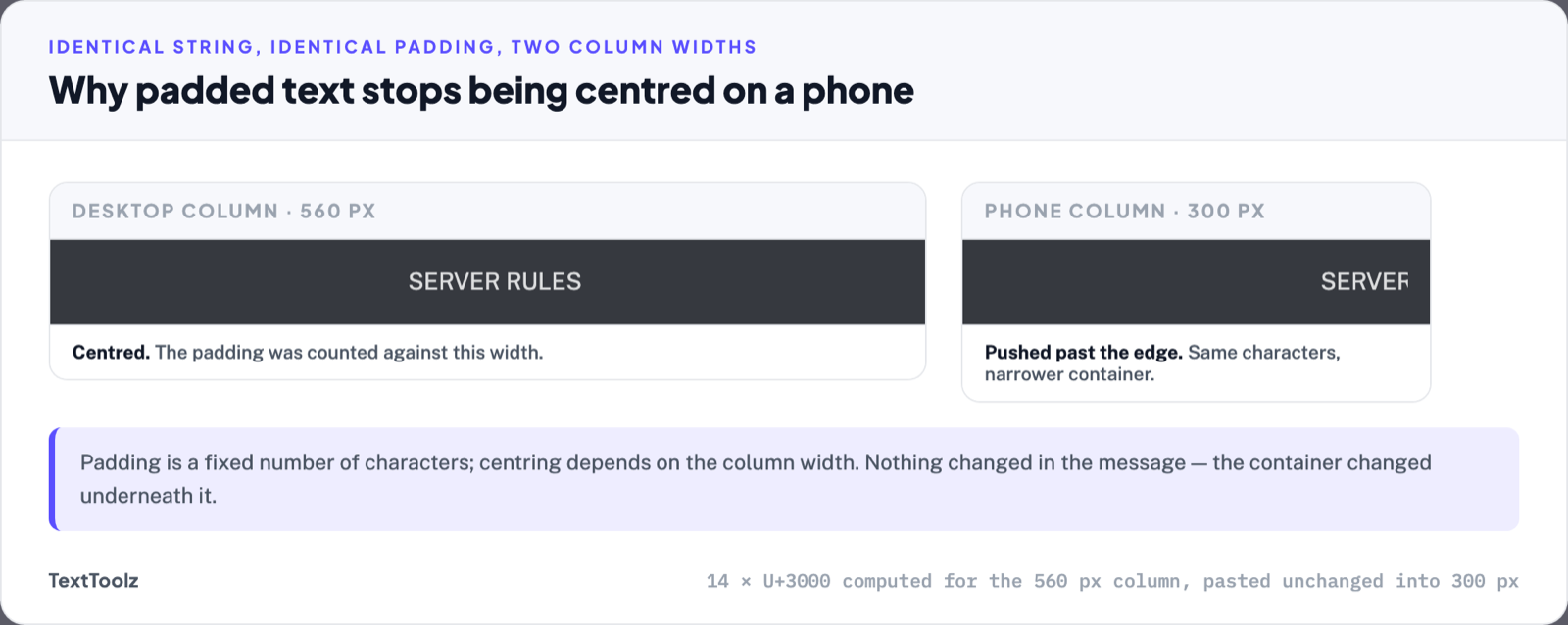
Padding is a fixed number of characters, and centring is a function of the column width, so any change in width moves the line. A Discord message column on a desktop window is several times wider than the same column at a 390-pixel phone width. Twenty ideographic spaces that centre a short line on the desktop client push the same line past the right edge on a phone, where it wraps and arrives visibly off-centre. Nothing has changed in the message; the container changed underneath it.
This is the limit of the technique rather than a mistake in applying it. Real alignment is decided by the renderer at display time; padding decides it once, at typing time, against one width. Where a line has to read correctly on both, the code block is the more predictable answer.
When is a code block the better answer?
A code block is the better answer whenever the spacing has to survive exactly, because triple-backtick blocks preserve whitespace instead of collapsing it. The trade is visible: the text renders in a monospace face inside a grey box, it does not wrap the way ordinary messages do, and it reads as code to anyone who scans the channel. For ASCII art, aligned tables and anything where two lines align with each other, that trade is worth taking. For a one-line announcement in a general channel, it is not.
What does padding do to screen readers?
Padding characters are content, so assistive software encounters them. U+2800 is a braille pattern rather than a space (its name is Braille Pattern Blank) and screen readers vary in whether they announce such characters, skip them, or read them as a symbol name. Zero-width characters produce no visual gap yet still sit in the string, which is what makes them useful for blank names and unhelpful for anyone listening to a channel. Where a message matters to everyone in a server, plain unpadded text is the accessible version.
Is Discord ever going to support text alignment?
There is no announced plan. Three of the ten results ranking for this question are alignment requests in Discord’s own community forum (one asking for justify and centre options, one proposing an arrow syntax such as → centre ←, and one titled simply “Centred Text”) and all three are open, unanswered by Discord, with the oldest dating to 2021. The Reddit thread on the same question was posted eight years ago and its community still treats the answer as a joke. Padding is not a temporary workaround pending a feature; it is the method.
Frequently asked questions
The questions below come up alongside the main one and are answered here rather than in their own sections.
Can a bot centre text in Discord?
A bot faces the same constraint, because it posts the same message format. Bot developers align output inside code blocks, where whitespace is preserved, which is why the aligned tables you see from bots are almost always monospace. The alignment comes from the code block, not from an alignment feature.
Does the invisible character work in channel names?
Channel names accept a different character set from messages, and Discord strips or transforms several characters there. A padding character that renders in a message is not guaranteed to survive in a channel name, a nickname or a server name, each of which validates its input separately.
How many characters does centring take?
Divide the empty space by the width of your padding character. A 40-character line inside a column that fits roughly 80 characters leaves 40 characters of space, so 20 ordinary-space widths sit on each side, which is about eight U+3000 ideographic spaces at 3.67 times the width, or twelve U+2800 braille blanks at 2.46 times. Count in front only; the trailing side needs nothing.
Is centred text against Discord’s rules?
Padding characters are ordinary Unicode text and are not prohibited. Using them to impersonate another member’s name, to evade moderation, or to disrupt a channel is covered by Discord’s community guidelines regardless of which characters are involved.
Discord has no centring feature, so every centred line you see was padded by hand, and the two characters worth padding with are U+2800 and U+3000, the only ones measured here that render wider than an ordinary space and survive whitespace collapsing. Everything else in circulation either collapses, matches a plain space, or has no width at all. Centre against the width you expect people to read on, use a centring tool to count the padding for you, and use a code block whenever the spacing has to hold exactly.