An accented letter is a base letter carrying a diacritic: the acute on é, the tilde on ñ, the umlaut on ü. On a Mac, hold Option and the accent key, release, then press the letter. On Windows, either use an Alt code or switch to the US International layout. On a phone, press and hold the letter and pick from the pop-up.
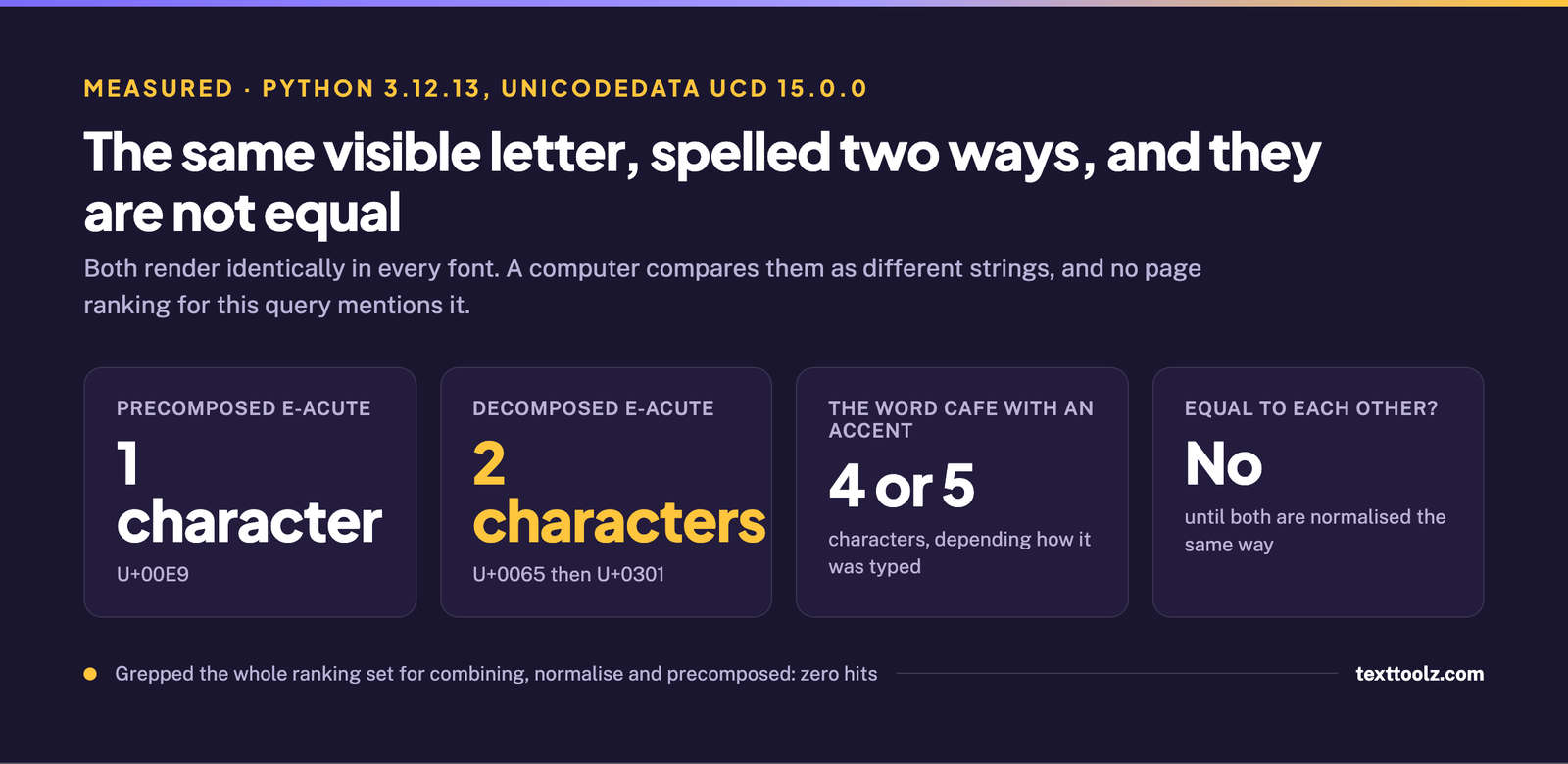
What none of the pages answering this question mention is that a computer can store the same visible letter in two different ways. é is either one character or two, depending on how you typed it, and the two are not equal. The word café is 4 characters written one way and 5 written the other. That is the reason accented text sometimes refuses to match in a search, and it is measured further down this page.
How Do You Type an Accented Letter on Windows?
There are two routes, and they are different in kind. One gives you a code per character. The other changes what your keyboard does, so that every accent becomes two keystrokes and you never look up a code again.
The per-character route is the Alt code: hold Alt, type a four-digit number on the numeric keypad, release. Alt 0233 gives é, 0225 gives á, 0237 gives í, 0243 gives ó, 0250 gives ú and 0241 gives ñ. The leading zero matters and is not optional; it selects which internal table Windows reads the number from, which is measured on our page about the degree symbol, where dropping or adding it gives you a completely different character. The full chart of every accented character already exists on accentletters.com, which ranks for this query and exists to be exactly that chart, so there is no point in this page becoming a second one.
The layout change that replaces the whole table
Switch to the US International keyboard layout in Windows language settings and the apostrophe, quote, caret, tilde and grave keys stop typing themselves immediately. They become dead keys: press the accent, then the letter, and you get the accented letter. An apostrophe then e gives é. A tilde then n gives ñ. This works in every application, with no codes to remember, and it is the answer to the question Google itself lists about typing accents on a QWERTY keyboard. It has a real cost and that is why people turn it back off: the apostrophe and quote keys now wait for a second keystroke, so typing an ordinary apostrophe means pressing the key and then the space bar. If you write in an accented language daily this is the right trade. If you need one accent a month it is not.
How Do You Type Accents on a Mac?
Hold Option and the accent key together, release both, then press the letter. Option e then e gives é. Option ` then a gives à. Option n then n gives ñ. Option u then u gives ü. The pattern is the same every time: the accent first as a dead key, the letter second.
There is a second method most Mac users have used without knowing it has a name. Press and hold the base letter itself and a small pop-up appears with every accented variant of it, selected with the arrow keys or by typing the number shown under the one you want. It is slower than the chord but needs nothing memorised. Note that macOS has no equivalent of the Windows Alt code at all, so none of the four-digit numbers on this page mean anything on a Mac.
How Do You Type Accents in Microsoft Word?
Word carries its own shortcuts that work regardless of which keyboard layout you are using, and they follow a single pattern: Ctrl plus the accent character, release, then the letter. Ctrl ' then e gives é. Ctrl ` then a gives à. Ctrl Shift ~ then n gives ñ. Ctrl Shift : then u gives ü. Turn Caps Lock on first for the uppercase forms.
The University of Tampa’s Languages and Linguistics department publishes the complete table and is worth going to for the rows not listed here. One detail in that table sets up a finding further down this page: two of its rows break the pattern. ø and æ do not get an accent-then-letter chord like everything else. They get dedicated ones, Ctrl / then o and Ctrl Shift & then a. The table does not say why, and there is a reason.
How Do You Type Accents on a Phone?
Press and hold the base letter on the on-screen keyboard, and a pop-up of its accented variants appears above your finger. Slide onto the one you want and release. The gesture is identical on iOS and on Android, and it is the method the forum thread ranking for this query recommends to the person who asked it.
This is worth saying plainly because the rest of the search treats phones as an afterthought: for most people this is the fastest accent input on any device they own, faster than a chord and much faster than a code. If you type one particular accented name repeatedly, set up a text replacement instead. On iOS that is Settings, General, Keyboard, Text Replacement. On Android it is the personal dictionary in your keyboard’s settings.
How Do You Type Accents on Linux and Chrome OS?
Use the Compose key, which appears on no page in this ranking set. Enable it in your keyboard settings, then press Compose, then the accent, then the letter: Compose, apostrophe, e gives é. It is the same mental model as a Mac dead key with a dedicated trigger key instead of a modifier.
The second route is the hexadecimal one: Ctrl Shift U together, release, then the code point, then Enter or space. 00E9 gives é. This is the same mechanism described on our page on typing an em dash, and it works on Chrome OS as well, where the Compose key generally does not.
Why Does My Accented Letter Not Match in a Search?
Because there are two ways to store the same visible letter, and you have one of each. This is the part of the subject that the pages answering this question do not cover, and it is the part that costs people time.
Measured with Python 3.12.13 and the unicodedata module at Unicode version 15.0.0: the letter é is either the single character U+00E9, or the two characters U+0065 and U+0301, which is a plain e followed by a combining acute accent. Both render identically in every font. Compared as strings they are not equal.
| Form | Code points | Length |
|---|---|---|
| Precomposed | U+00E9 |
1 character |
| Decomposed | U+0065 then U+0301 |
2 characters |
| The word café, precomposed | c a f + one character | 4 characters |
| The word café, decomposed | c a f + two characters | 5 characters |
The consequences are all things people meet without diagnosing: a search box that finds nothing when the word is clearly on the page, two records that are obviously duplicates and are not detected as duplicates, a character counter that reads one too high for every accent, a form that rejects a name for being too long. Which form you end up with depends on how the text was typed and what software touched it afterwards, which is precisely what this page is about.
We checked whether any of this appears in the pages that rank for this query, rather than assuming. Every extracted page was searched for the words combining, normalise, normalize and precomposed, and for the combining-mark code point range. There were zero hits. This is the same class of problem as the invisible characters that survive a copy and paste: the text looks right and stops matching. The fix is to normalise both sides to the same form before comparing them.
Which Accented Letters Cannot Be Built From a Letter and a Mark?
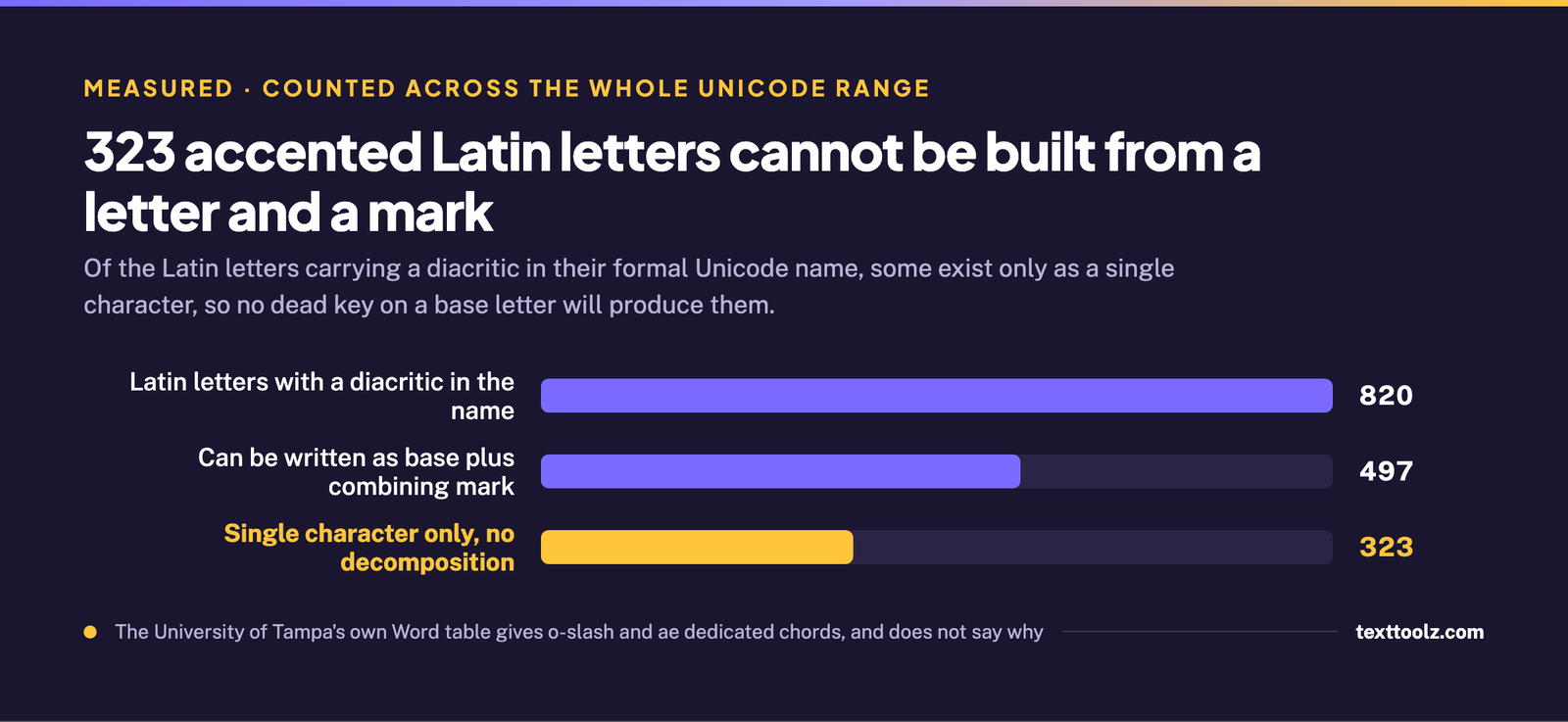
323 of them. Not every accented letter can be assembled from a base letter plus a combining mark, and the ones that cannot are the ones that break the neat pattern in every shortcut table.
Counting across the whole Unicode range: 820 Latin letters carry a diacritic in their formal Unicode name. Of those, 497 have a canonical decomposition, meaning they can equally be written as a base letter followed by a combining mark. The other 323 have no decomposition at all and exist only as single characters. The ones you are most likely to meet are ø, ł, đ and æ.
The practical consequence: no dead key, no Compose sequence and no accent-then-letter chord will produce them, because there is no mark to combine with the base letter. A stroke through a letter is not an accent sitting on top of it; it is part of the letter. Those characters need their own key on a national layout, their own dedicated shortcut, or a character picker.
The best evidence for this is already sitting in the ranking set without being explained. The University of Tampa’s Word table uses accent-then-letter for every row it has, except for ø and æ, which are given dedicated chords instead. It had to make that exception, and the page never says why. This is why.
Does Normalising Fix It?
Usually, and not always, which is the part worth knowing. Normalisation is the standard answer to the mismatch described above, and it works: convert both strings to the same form and they compare equal. What it does not guarantee is one code point per visible letter.
The exception is measurable and worth stating. NFC, the composing form, only combines a base letter and a mark when a single precomposed character actually exists for that pair. A plain e with a combining acute becomes the one-character é. But a q with a combining acute stays two characters after full normalisation, and so does a z with a combining tilde, because Unicode defines no single character for either combination. Combining marks can also be stacked without limit, which is the mechanism behind zalgo text, where a single letter carries dozens of them.
So the rule to work by is narrower than the usual advice: normalise both sides to the same form before you compare, sort or deduplicate, and expect that to make them consistent with each other rather than to make every letter one character.
What This Page Does Not Claim
No Windows keystroke here was tested by us. There is no Windows machine in this environment, so every shortcut is reported as what its named source publishes.
One thing was measured and is deliberately left out. It is widely repeated that macOS stores filenames in decomposed form, so a name saved with a precomposed accent comes back decomposed. Tested on this machine, it did not happen: the file listed back with the identical precomposed character. That claim describes the older HFS+ filesystem rather than current APFS behaviour, so it is not repeated here. The full chart of accented characters and their codes belongs to accentletters.com, which ranks for this query and is named rather than copied.
How This Guide Was Built
Five ranking results were captured live on 3 September 2026 with the country set to the United States and personalisation off, and the AI Overview was captured twice. Three pages were extracted directly at no cost, one through a proxy after the first tool returned 64 characters, and one is recorded as blocked with the tool and the reason: it is a help-centre article that renders its body behind a JavaScript shell, and a paid fetch was not spent on it because a fourth shortcut table changes nothing about what this page needs to say.
The thinness of that set is worth stating plainly rather than dressing up: only one page ranking for this question is a full article, and the rest are lookup tables and a forum thread. Keyword research was run the same day against Google autocomplete. Character facts were measured with Python 3.12.13 and unicodedata at Unicode version 15.0.0, and the filesystem behaviour was tested directly on this machine rather than taken from documentation.
Sources credited by name above: accentletters.com and the University of Tampa Department of Languages and Linguistics.