About the D&D Warlock Name Generator
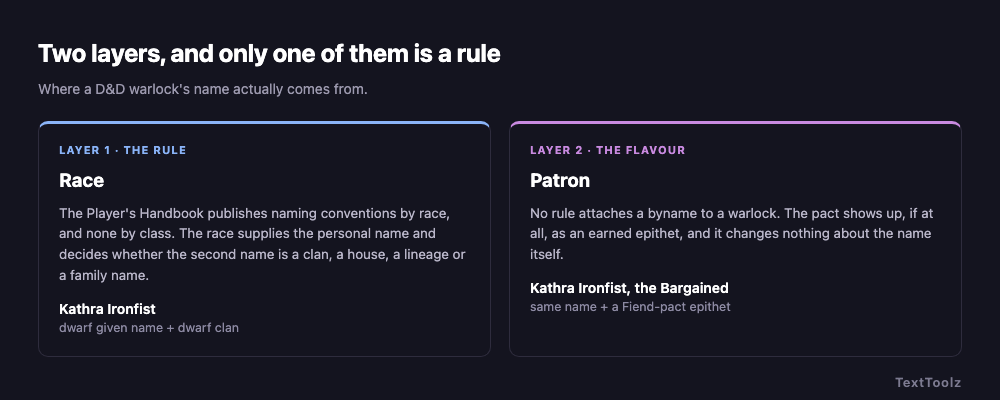
A D&D warlock name is the name of the character's race, optionally followed by an epithet earned from their pact. The rules contain no warlock naming system at all: the Player's Handbook publishes naming conventions race by race, and the class chapter publishes none. This generator carries 21 race settings, 8 patrons and separate male and female tables, and the sections below state which of those two layers is a rule and which is flavour.
Why does a D&D warlock's name come from their race?
A warlock's name comes from their race because race is the only category D&D gives naming tables to. There is no wizard naming system, no rogue naming system and no warlock naming system. Class decides what a character does, and race decides what they are called.
This is where most warlock name lists come apart. A single pool of dark-sounding syllables belongs to no people, so the names it produces cannot sit beside an elf's family name or a dwarf's clan without sounding borrowed from somewhere else. The fix is to pick the race before drawing a syllable, which is why Race is the first control in the tool and not an afterthought.
Google's own answer engine agrees, which is easy enough to check. Search for warlock names, read the AI Overview to the end, and it closes by asking what it would need to do better: "tell me your character's race, patron type (fiend, fey, or old one)". Race and patron. Those are the two controls on this page, in that order, and they are what the answer engine asks for once it has finished guessing.
What second name does each D&D race use?
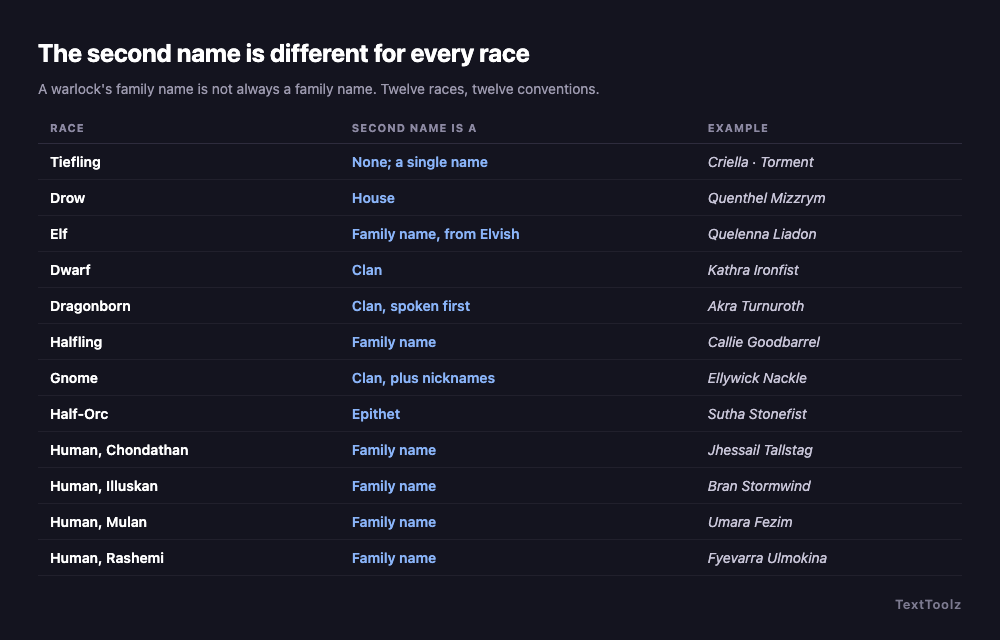
Each D&D race uses a different kind of second name, not merely a different sound. The table below groups the 21 race settings the generator carries into 14 rows, what their second name actually is, and a worked example. The pattern to read from it is that four different objects, clan, house, lineage and family name, are doing the same structural job.
| Race | Second name is a | Example |
|---|---|---|
| Dwarf | Clan, and it is never dropped | Bardryn Ironfist |
| Elf | Family name that translates from Elvish | Caelynn Nailo (Nightbreeze) |
| Drow | House, and the house carries the status | Quenthel Baenre |
| Dragonborn | Long clan name, spoken first on formal terms | Uadjit Verthisathurgiesh |
| Goliath | Awarded nickname, then a clan name | Thotham "Fearless" Ogolakanu |
| Tabaxi | Clan name, which is a place | Jade Shoe of Distant Rain |
| Halfling | Warm family name | Merric Goodbarrel |
| Gnome | Clan name, plus collected nicknames | Boddynock Nackle |
| Human | Family name, and its shape depends on which of the 8 ethnicities | Aoth Fezim, Bran Stormwind |
| Half-Elf | Whichever parent culture raised them | Either a human or an elf convention |
| Aasimar | The host mortal culture they grew up in | Whatever that culture uses |
| Half-Orc | Earned epithet, written for this tool | Krusk Skullsplitter |
| Tiefling | None. An Infernal name or a chosen Virtue | Damaia, or Temerity |
| Kenku | None. The name is a sound it mimics | Cracking Ice |
Humans are one row here and eight settings in the generator. The Forgotten Realms human ethnicities are separate naming systems rather than one pool, and the generator carries eight of them. Treating humans as a single group is the second most common flaw in generated D&D names.
What does a warlock's patron change about a D&D name?
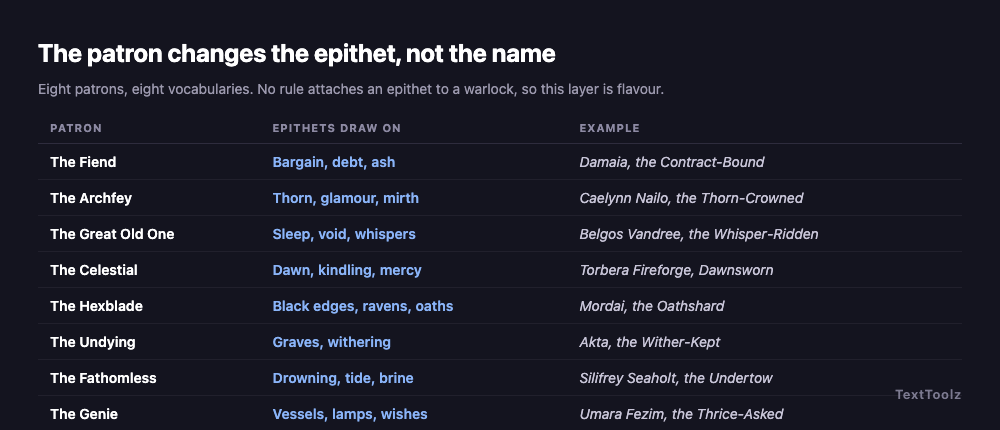
A D&D warlock's patron changes the epithet and nothing else. It does not touch the personal name or the second name. Eight patrons are available, and each draws its bynames from a different vocabulary, listed below with a worked example.
| Patron | Epithets draw on | Example |
|---|---|---|
| The Fiend | Bargain, debt, fire and ash | Damaia, the Contract-Bound |
| The Archfey | Thorn, glamour, mirth and its absence | Caelynn Nailo, the Thorn-Crowned |
| The Great Old One | Sleep, void, whispers, distance | Belgos Vandree, the Whisper-Ridden |
| The Celestial | Dawn, kindling, mercy | Torbera Fireforge, Dawnsworn |
| The Hexblade | Black edges, ravens, oaths | Mordai, the Oathshard |
| The Undying | Graves, withering, refusal to end | Akta, the Wither-Kept |
| The Fathomless | Drowning, tide, brine | Silifrey Seaholt, the Undertow |
| The Genie | Vessels, lamps, wishes counted out | Umara Fezim, the Thrice-Asked |
One thing worth stating plainly, because none of the six ranking pages checked for this article state it: no rule attaches an epithet to a warlock. Layer one is the rules, layer two is flavour, and the generator lets you switch it off with the No epithet option.
What are good female warlock names in D&D?
Good female warlock names in D&D are drawn from the female table of the chosen race, such as Bryseis for a tiefling, Quelenna Liadon for an elf, or Kathra Ironfist for a dwarf. All 21 race settings carry separate male and female tables, and a name pulled from the wrong one is the single most common tell in a generated D&D name.
Tiefling women have two legitimate routes and the generator offers both. The first is an Infernal lineage name such as Bryseis, Makaria or Criella. The second is a Virtue name, chosen in deliberate rejection of that lineage: Hope, Sorrow, Temerity, Nowhere.
Why does every tiefling warlock end up called Vendetta?
Ask a table for the most stereotypical tiefling hexblade name and the answers come back fast: Vendetta, Edge, Hex, Mercy, V. It is one of the most reliable jokes in D&D character naming, and the interesting part is why that particular shape is the cliché rather than some other one.
Every one of those names is an abstract noun used as a personal name, and that is a published tiefling convention, not an invention. The Player's Handbook gives tieflings two naming routes: an Infernal name inherited from the bloodline, or a Virtue name chosen in defiance of it. The virtues it lists include Torment, Sorrow, Creed, Temerity, Despair, Glory, Hope and Quest. A tiefling warlock called Vendetta is doing precisely what the rules say tieflings do. The joke is not that the name is wrong; it is that the player reached for the bleakest word available and stopped there.
Which tells you how to use the route without landing in the joke. The Virtue names that land are the ones that sit against the character rather than on top of them: a pact-bound warlock called Hope is a harder character than one called Torment, because the name is an argument the character is having with themselves. Set Race to Tiefling and the generator draws from both routes, the Infernal and the Virtue, so a batch shows you the two shapes side by side.
What is a D&D warlock's true name?
A D&D warlock's true name is the name their patron knows, distinct from the one they use in public. No D&D rule binds a warlock through their true name, so this is a storytelling convention rather than a mechanic, and it is worth saying so before a player builds a plot around it expecting the rules to back them up.
The usable version at a table is three names: one the town knows, one other spellcasters know, and one only the patron knows. Generate the public name from the character's race, then generate a second with the patron epithet switched on and keep it off the character sheet.
Which warlocks in D&D are actually named in the lore?
The most widely known named warlock is Wyll Ravengard, a companion in Baldur's Gate 3, bound by pact to the cambion Mizora. Beyond him the honest answer is that D&D's lore names patrons far more often than it names warlocks: Zariel, the fallen angel who rules Avernus, and Asmodeus, archdevil of the Nine Hells, are household names among players, while the warlocks bound to them are mostly player characters rather than published figures.
Two cautions belong with that answer. First, no rule ranks warlocks by power, so the frequently asked question of who the most powerful warlock is has no answer inside the game's text. Second, several widely circulated famous-warlock lists mix three incompatible things and present them identically. Raistlin Majere and Elminster Aumar are genuine D&D canon but they are wizards, not warlocks: Raistlin is a Dragonlance mage of the Black Robes and Elminster is a Forgotten Realms archmage and Chosen of Mystra, and neither holds a pact. Names such as Mystogan and Merlinius are simply invented. A reader taking any of those to a table as a famous warlock is repeating someone else's category error.
Are D&D warlock names the same as WoW warlock names?
No. Three different things share the phrase warlock names in search results, and separating them is the fastest way to get a name that fits where you need it:
- D&D warlocks are named by race and spoken aloud at a table, so a name is usually two parts, a personal name plus a clan, house, lineage or family name. That is what this generator produces.
- World of Warcraft warlocks need a single unique string for a character-name field, so those names trend to one invented word with no second part.
- Witches and warlocks in folklore carry ordinary period names. Figures such as Prospero or Elphaba come from fiction, not from a naming system.
72 D&D warlock names to roll or pick (D66 table)
The table below holds 72 warlock names, 36 male and 36 female, each labelled with the race it belongs to. It is arranged as a D66 table, which means you roll two six-sided dice and read one as the tens digit and the other as the ones, or you ignore the dice and pick.
| Roll | Male | Race | Female | Race |
|---|---|---|---|---|
| 11 | Akmenos | tiefling | Bryseis | tiefling |
| 12 | Damakos | tiefling | Criella | tiefling |
| 13 | Mordai | tiefling | Makaria | tiefling |
| 14 | Torment | tiefling virtue | Sorrow | tiefling virtue |
| 15 | Creed | tiefling virtue | Temerity | tiefling virtue |
| 16 | Skamos | tiefling | Phelaia | tiefling |
| 21 | Belgos Vandree | drow | Quenthel Mizzrym | drow |
| 22 | Nimor Xorlarrin | drow | Vierna Baenre | drow |
| 23 | Rizzen Duskryn | drow | Shakti Hunzrin | drow |
| 24 | Houndaer Melarn | drow | Chalithra Vandree | drow |
| 25 | Tluth Symryvvin | drow | Zeerith Xorlarrin | drow |
| 26 | Dinin Agrach Dyrr | drow | Briza Tuin'Tarl | drow |
| 31 | Laucian Nailo | elf | Caelynn Liadon | elf |
| 32 | Soveliss Amakiir | elf | Quelenna Siannodel | elf |
| 33 | Mindartis Holimion | elf | Naivara Xiloscient | elf |
| 34 | Erdan Meliamne | elf | Theirastra Galanodel | elf |
| 35 | Varis Amastacia | elf | Shanairra Ilphelkiir | elf |
| 36 | Aramil Galanodel | elf | Valanthe Nailo | elf |
| 41 | Fargrim Ironfist | dwarf | Kathra Fireforge | dwarf |
| 42 | Thoradin Frostbeard | dwarf | Riswynn Balderk | dwarf |
| 43 | Vondal Loderr | dwarf | Bardryn Torunn | dwarf |
| 44 | Orsik Strakeln | dwarf | Torbera Holderhek | dwarf |
| 45 | Taklinn Ungart | dwarf | Eldeth Brawnanvil | dwarf |
| 46 | Rurik Dankil | dwarf | Vistra Gorunn | dwarf |
| 51 | Rhogar Norixius | dragonborn | Akra Turnuroth | dragonborn |
| 52 | Medrash Kimbatuul | dragonborn | Uadjit Delmirev | dragonborn |
| 53 | Torinn Myastan | dragonborn | Thava Shestendeliath | dragonborn |
| 54 | Balasar Nemmonis | dragonborn | Korinn Yarjerit | dragonborn |
| 55 | Aoth Fezim | human, Mulan | Umara Ankhalab | human, Mulan |
| 56 | Thazar-De Hahpet | human, Mulan | Nephis Sepret | human, Mulan |
| 61 | Bran Stormwind | human, Illuskan | Silifrey Hornraven | human, Illuskan |
| 62 | Geth Ravenscar | human, Illuskan | Kethra Brightwood | human, Illuskan |
| 63 | Madislak Stayanoga | human, Rashemi | Fyevarra Ulmokina | human, Rashemi |
| 64 | Krusk Skullsplitter | half-orc | Kansif Grimtusk | half-orc |
| 65 | Boddynock Nackle | gnome | Ellywick Raulnor | gnome |
| 66 | Merric Goodbarrel | halfling | Kithri Thorngage | halfling |
How do you pick a D&D warlock name you can say at the table?
Read the name aloud once to another person and ask them to repeat it. A name that survives that test survives the campaign, and a name that does not gets shortened by the table within three sessions whether you agree or not. Long names are not the problem: dragonborn clan names such as Verthisathurgiesh are supposed to be a mouthful. Keep the personal name sayable and let the clan name be as long as its race demands.
Where do these D&D warlock names come from?
These D&D warlock names are assembled from race tables that follow the naming conventions published in the Dungeons & Dragons Player's Handbook, which is the standard this generator is built against, and the drow personal and house names follow established Forgotten Realms naming. Two layers are written for this tool rather than published: the half-orc epithets, because the rules give half-orcs a personal name and no surname, and the patron epithets, which are drawn from the flavour of each patron. Neither is quoted from any rulebook, and as the patron section states, no rule attaches an epithet to a warlock. Dungeons & Dragons is a trademark of Wizards of the Coast, and TextToolz is neither affiliated with nor endorsed by Wizards of the Coast.
Names are assembled in your browser. No request leaves the page, nothing is logged, and the generator works with the network disconnected.
Other D&D name generators
The same 21 race tables drive every generator in this set, so a name from any of them sits correctly beside a name from this page. If your character is not a warlock, the D&D Name Generator runs the race layer with no class epithet, and the D&D Monk Name Generator swaps patron epithets for monastic titles. Once the name is settled, the text style generators will set it in the fonts a character sheet or a Discord profile will accept.