About the D&D Name Generator
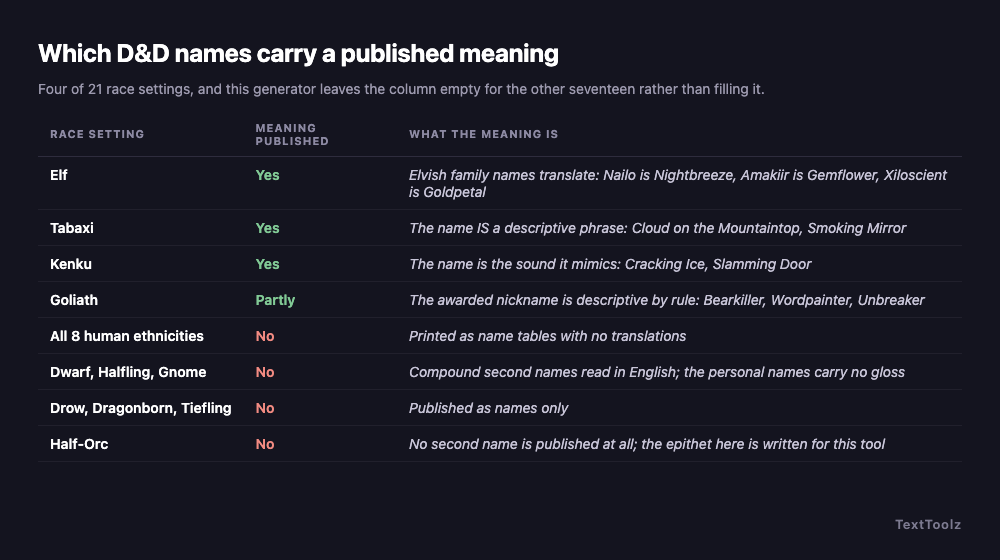
A D&D character name is a personal name plus a second name whose kind is set by race. This generator holds 21 race settings, 8 human ethnicities and 60 worked examples, and it shows a meaning on 4 of the 21 because those are the only ones where a meaning is published. Elvish family names translate, tabaxi names are descriptive phrases, kenku names are sounds and goliath nicknames are earned descriptions. Everything else is printed as a name table with no translation attached, and this page says so rather than filling the column.
What is a D&D character name made of?
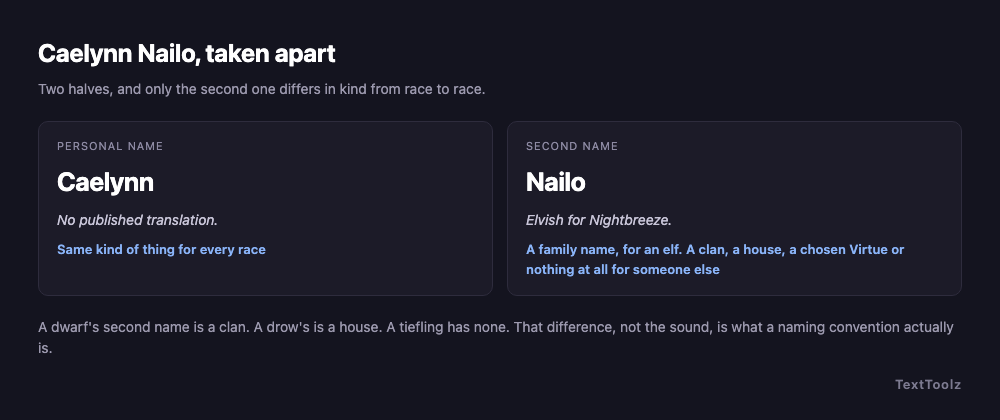
A D&D character name is a personal name plus a second name, and the second name is a different kind of thing for almost every race. Caelynn Nailo is an elf: Caelynn is the personal name and Nailo is a family name that means Nightbreeze in Elvish. Bardryn Ironfist is a dwarf, and Ironfist is a clan rather than a family, which is why a dwarf never drops it. Quenthel Baenre is a drow, and Baenre is a house, which is the half of the name other drow are actually listening for.
That distinction is the whole design of this generator. Every competing D&D name generator treats the second name as a sound to be produced, so it produces one flat pool of fantasy-flavoured words and attaches them to any race. The published conventions are not a pool of sounds. They are eleven different structures, and picking the wrong structure is the error a reader notices before they notice a bad syllable.
What is the second name, race by race?
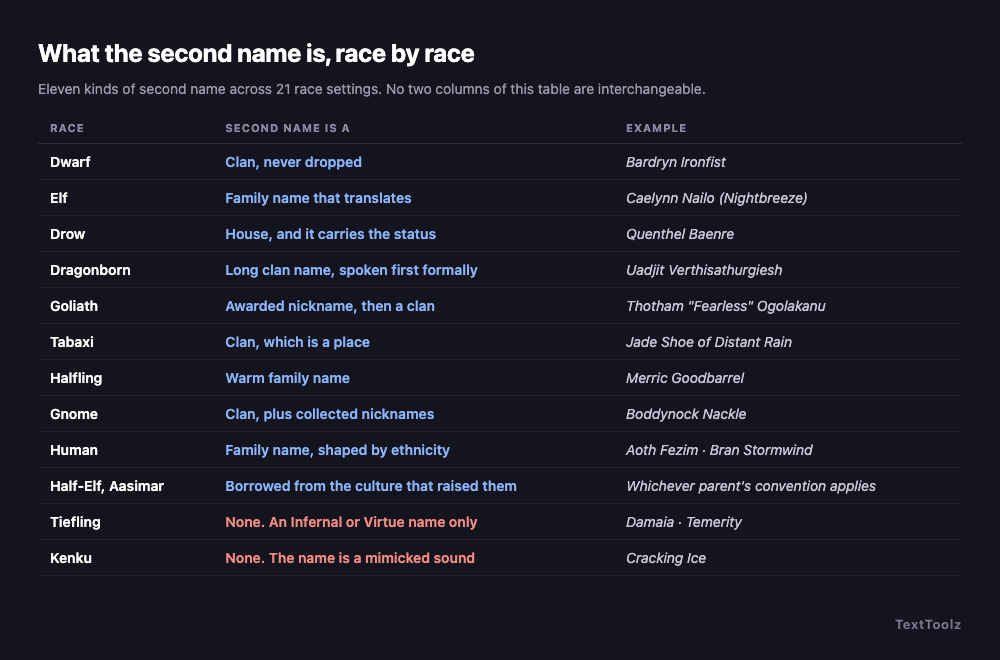
The 21 race settings resolve into the 14 rows below, and no two rows are interchangeable. The table names each one, what its second name actually is, and a published example. Two of the rows carry no second name at all, which is the part every other generator quietly gets wrong by attaching a surname anyway.
| Race | The second name is a | Example |
|---|---|---|
| Dwarf | Clan, and it is never dropped | Bardryn Ironfist |
| Elf | Family name that translates from Elvish | Caelynn Nailo (Nightbreeze) |
| Drow | House, and the house carries the status | Quenthel Baenre |
| Dragonborn | Long clan name, spoken first on formal terms | Uadjit Verthisathurgiesh |
| Goliath | Awarded nickname, then a clan name | Thotham "Fearless" Ogolakanu |
| Tabaxi | Clan name, which is a place | Jade Shoe of Distant Rain |
| Halfling | Warm family name | Merric Goodbarrel |
| Gnome | Clan name, plus collected nicknames | Boddynock Nackle |
| Human | Family name, and its shape depends on ethnicity | Aoth Fezim, Bran Stormwind |
| Half-Elf | Whichever parent culture raised them | Either a human or an elf convention |
| Aasimar | The host mortal culture they grew up in | Whatever that culture uses |
| Half-Orc | Earned epithet, written for this tool | Krusk Skullsplitter |
| Tiefling | None. An Infernal name or a chosen Virtue | Damaia, or Temerity |
| Kenku | None. The name is a sound it mimics | Cracking Ice |
Two rows in that table are honest about a limit rather than filling a gap. The half-orc epithet is written for this tool, because no half-orc second name is published anywhere, and calling Skullsplitter a convention would be inventing one. Half-elves and aasimar borrow, because borrowing is their published convention: a half-elf uses a human or an elven name, and an aasimar uses the names of the mortal culture that raised them. This generator borrows a real table and tells you which one it took, instead of inventing a third list to fill the row.
Which D&D names actually have a published meaning?
Four of the 21 race settings, and no more. Elvish family names carry published translations, so Nailo is Nightbreeze, Amakiir is Gemflower and Xiloscient is Goldpetal. A tabaxi name is its meaning, because the convention is a whole descriptive phrase: Cloud on the Mountaintop, Smoking Mirror, Left-Handed Hummingbird. A kenku name is the sound the kenku mimics, because a kenku has no voice of its own. A goliath nickname is descriptive by rule, awarded for something the character actually did. Everything else, including all 8 human ethnicities and every dwarf, halfling, gnome, drow and dragonborn name in the tables, is published as a name with no translation beside it.
That matters because the first thing Google offers next to this search is "with meaning", and the field answers it by making meanings up. The generator currently ranking first for this query sells "meaning plus story hook" as its headline feature. Read on 2026-09-16, one batch of five elf names from it returned "Quiet wonder carried through the night garden" for Syliel Mistbloom and "Keen memory carried through the sunlit archive" for Aeriara Glimmerwhisper, with a third name in the same batch sharing the phrase "Keen memory carried through the". None of those sentences translates anything. They are atmosphere assembled from a template and printed in a column labelled Meaning. The same page's pronunciation field renders Mistbloom as "Mi-Stbloo-M", which splits the letters rather than the word.
So this generator does the opposite. Where a translation is published it prints the translation. Where none is published the space stays empty, and that empty space is the honest answer to a question the whole SERP is answering dishonestly.
Why do generated D&D names sound like a keyboard smash?
Because most generators produce syllables rather than following a convention, and a reader hears the difference immediately. The complaint is the audience's own. A player opening the r/DnD thread that ranks in the top ten for this query in September 2026 wrote that generator output is "hit or miss", that some tools "give you names that sound like someone just smashed their keyboard", and that what they actually wanted was "something that understands the linguistic feel of different races", because "elven names should flow, dwarven names should have that guttural, stone-like weight". The same post complains that tools "mix cultural cues in weird ways", which is the structural error described above rather than a matter of taste.
The uncomfortable part is what Google's own AI Overview recommends. Read on 2026-09-16 for the query dnd character names, its first tip for naming a character is "Key Smash: hit 3 to 5 random keys, add vowels, and tweak the spelling". Its third tip, further down, is "check sourcebooks: official rulebooks feature lore-friendly naming conventions and sample lists for each race", attributed to a Role-playing Games Stack Exchange answer that says simply "consult your sourcebooks". The AI Overview is ranking the exact defect its own cited source is warning against above the method that source recommends. This page takes the third tip and builds it.
Is a D&D surname like Stonefist wrong?
No, but it is one convention out of eleven and it is the one every generator over-uses. Compound descriptive surnames are correct for dwarves, halflings and the half-orc epithet, where a clan or family name built from two plain English words is exactly what the tables publish. They are wrong as a default for everyone else, and using them everywhere is what makes a party roster read as though one person named all of it in an afternoon.
Two communities make the same complaint from opposite ends. A commenter in the r/DnD thread argues for looking up real-world ethnic names instead, because a name "doesn't have to be something like Rockbuster Stonethirst that screams Dwarf". A dungeon master in the r/DungeonsAndDragons naming thread complains that their players "always want to choose stuff like Tiara Silverbloom and Rock Ironboot". Set those against the verified default output of the generator currently ranking first for this query: Syliel Mistbloom, Aeleleth Glimmerbough, Aeriara Glimmerwhisper. The tool at the top of the results produces, by default, the exact name class the audience posts to complain about.
The nine human ethnicities are nine naming systems
Humans are the most-played race and the one every generator flattens into a single list. The Forgotten Realms publishes nine human ethnicities with genuinely different naming languages, and treating them as one pool is why generated human names drift toward generic pseudo-medieval mush. This generator implements eight distinct tables and states plainly that the ninth, Tethyrian, uses Chondathan names, rather than inventing a table to make the count look complete.
| Ethnicity | Where | Shape of the name | Example |
|---|---|---|---|
| Chondathan | The Heartlands default | Plain-spoken given name, descriptive surname | Gorstag Amblecrown |
| Illuskan | The cold North | Short, hard given names; weather-and-iron surnames | Bran Stormwind |
| Calishite | Calimshan, in the south | Arabic-derived shapes, short surnames | Khemed Pashar |
| Damaran | Damara and the Vast | Slavic-shaped given names, surnames ending hard | Grigor Kulenov |
| Mulan | Thay and Mulhorand, the old empire | Formal, frequently hyphenated | Thazar-De Fezim |
| Rashemi | Rashemen | Slavic-inflected and consonant-heavy | Madislak Murnyethara |
| Shou | Kara-Tur, the largest ethnicity in the Realms | Family name spoken first at home | Jiang Huang |
| Turami | Turmish, on the Inner Sea | Romance-shaped given names and surnames | Rimardo Marivaldi |
| Tethyrian | Tethyr and the Sword Coast | Uses Chondathan names, with no separate table | Covered by the Chondathan setting |
One reference site publishes eight of these ethnicities correctly and then adds a Meaning column beside every name, giving Aseir as "noble leader" and Atala as "little maiden". Those personal names are published as name tables with no translations, and no source is given for the meanings. The ethnicities on that page are right and the meanings are not checkable, which is the distinction this page keeps: the Shou and Turami settings here produce names from their own tables, and neither carries a gloss.
What do goliaths, tabaxi and kenku name themselves after?
Three published conventions outside the core races, and all three are arguments for building a generator on conventions rather than on sounds, because none of them can be produced by a syllable masher at all.
- A goliath carries three names. A birth name, a nickname the tribe awards for something the character has actually done, and a clan name. Thotham "Fearless" Ogolakanu is all three at once, and the middle one can be taken back, which makes it the only part of any D&D name that a character can lose without dying.
- A tabaxi name is a whole descriptive phrase, used in full on formal occasions and cut to one word everywhere else, with a clan name that is a place. Cloud on the Mountaintop of Bright Cliffs becomes Cloud at the table.
- A kenku is named for a sound it mimics, because it cannot speak in a voice of its own. Cracking Ice, Slamming Door, Jingling Coins. There is no second name at all, and the name is its own explanation.
Three other races that appear on competing race lists are deliberately absent here. Genasi and firbolg have no distinct published naming table: both take the names of the culture that raised them, which the Human and Elf settings already produce. Orc shares the half-orc table that this generator already implements, so listing it separately would add an option and no names. Three fewer entries in the dropdown is the honest version of a list that a competitor pads to fifty-five.
Does your D&D name survive being said out loud?
A D&D name has to survive being said weekly, aloud, by five people, and the test takes ten seconds. Read it once to someone and ask them to repeat it. If they cannot, the table will shorten it by session three and you will spend the campaign as "Zee". That is not an argument against long names: dragonborn clan names are supposed to be a mouthful, and Verthisathurgiesh is doing its job. It is an argument that the personal name has to be sayable, because that is the half anyone uses.
Both community threads rate this above everything else, and one competing site makes the same point well: a generated name is a seed rather than a verdict. Keep the sound if it works, change an ending that lands too soft, and put the result through the repeat test before you write it on a sheet.
How do you name a whole party or a table of NPCs?
Generate a batch inside a single race setting, keep the two or three you need, and save the rest as a roster. The r/DnD thread that ranks for this query opens with a dungeon master who needed three names for a dwarven mining town and had run dry mid-prep; another commenter describes a homebrew spreadsheet that emits a name, a physical trait, a personality trait and a voice cue together, because the real need under this query is a usable non-player character row rather than a single word.
Two mechanics here serve that directly. A batch of 50 is deduplicated on the base name, so a list never repeats itself, and the status line says so honestly when a small pool runs out: the kenku setting holds 18 unique names and will tell you that rather than quietly returning a short list. Download .txt saves the batch with its meanings and a header naming the race, the gender setting and the date, so a file found in a campaign folder a month later still explains itself.
60 D&D names, with a meaning where one is published
Sixty names from this generator's own tables, grouped by race. The meaning column is filled for the elf, tabaxi, kenku and goliath rows, which are the four settings a meaning is published for, and empty for the rest. The tiefling rows carry a note rather than a meaning, because whether a tiefling name is Infernal or a chosen Virtue is a fact about the name without being a translation of it. Competing pages publish two hundred to three hundred names each and not one entry on any of them can be checked against a table, so the count is not the differentiator.
| Name | Race | Published meaning |
|---|---|---|
| Caelynn Nailo | Elf | Nailo is Elvish for Nightbreeze |
| Aramil Amakiir | Elf | Amakiir is Elvish for Gemflower |
| Mialee Xiloscient | Elf | Xiloscient is Elvish for Goldpetal |
| Theren Galanodel | Elf | Galanodel is Elvish for Moonwhisper |
| Naivara Siannodel | Elf | Siannodel is Elvish for Moonbrook |
| Soveliss Holimion | Elf | Holimion is Elvish for Diamonddew |
| Quelenna Liadon | Elf | Liadon is Elvish for Silverfrond |
| Erevan Meliamne | Elf | Meliamne is Elvish for Oakenheel |
| Cloud on the Mountaintop of Bright Cliffs | Tabaxi | Shortened to Cloud by anyone not making a speech |
| Smoking Mirror of Distant Rain | Tabaxi | Shortened to Mirror in ordinary use |
| Seven Thundercloud of Rumbling River | Tabaxi | Shortened to Thunder in ordinary use |
| Left-Handed Hummingbird of Mountain Tree | Tabaxi | Shortened to Bird in ordinary use |
| Jade Shoe of Snoring Mountain | Tabaxi | Shortened to Jade in ordinary use |
| Cracking Ice | Kenku | The sound this kenku mimics, which is the only voice it has |
| Hissing Kettle | Kenku | The sound this kenku mimics |
| Slamming Door | Kenku | The sound this kenku mimics |
| Jingling Coins | Kenku | The sound this kenku mimics |
| Whistling Wind | Kenku | The sound this kenku mimics |
| Thotham "Fearless" Ogolakanu | Goliath | The nickname is awarded for something done and can be taken back |
| Paavu "Steadyhand" Gathakanathi | Goliath | The nickname is awarded, the clan name is not |
| Aukan "Wordpainter" Thunukalathi | Goliath | The nickname is awarded, the clan name is not |
| Nalla "Skywatcher" Kalagiano | Goliath | The nickname is awarded, the clan name is not |
| Uthal "Bearkiller" Vaimei-Laga | Goliath | The nickname is awarded, the clan name is not |
| Bardryn Ironfist | Dwarf | None published |
| Thoradin Battlehammer | Dwarf | None published |
| Torbera Fireforge | Dwarf | None published |
| Rurik Frostbeard | Dwarf | None published |
| Kathra Balderk | Dwarf | None published |
| Merric Goodbarrel | Halfling | None published |
| Kithri Tealeaf | Halfling | None published |
| Wellby Thorngage | Halfling | None published |
| Portia Brushgather | Halfling | None published |
| Boddynock Nackle | Gnome | None published |
| Ellywick Timbers | Gnome | None published |
| Namfoodle Folkor | Gnome | None published |
| Quenthel Baenre | Drow | None published |
| Drizzt Do'Urden | Drow | None published |
| Liriel Xorlarrin | Drow | None published |
| Zeerith Mizzrym | Drow | None published |
| Uadjit Verthisathurgiesh | Dragonborn | None published |
| Rhogar Kepeshkmolik | Dragonborn | None published |
| Farideh Clethtinthiallor | Dragonborn | None published |
| Torinn Shestendeliath | Dragonborn | None published |
| Damaia | Tiefling | An Infernal name, carried down and not chosen |
| Mordai | Tiefling | An Infernal name, carried down and not chosen |
| Temerity | Tiefling | A Virtue name, chosen in place of the Infernal one |
| Reverence | Tiefling | A Virtue name, chosen in place of the Infernal one |
| Krusk Skullsplitter | Half-Orc | The epithet is written for this tool; no half-orc surname is published |
| Ownka Grimtusk | Half-Orc | The epithet is written for this tool |
| Gorstag Amblecrown | Human (Chondathan) | None published |
| Bran Stormwind | Human (Illuskan) | None published |
| Khemed Pashar | Human (Calishite) | None published |
| Grigor Kulenov | Human (Damaran) | None published |
| Thazar-De Fezim | Human (Mulan) | None published |
| Madislak Murnyethara | Human (Rashemi) | None published |
| Jiang Huang | Human (Shou) | None published |
| Rimardo Marivaldi | Human (Turami) | None published |
| Silifrey Ravenscar | Half-Elf | Built on the Illuskan convention, one of the two a half-elf may use |
| Felosial Holimion | Half-Elf | Built on the elf convention, the other one a half-elf may use |
| Marta Agosto | Aasimar | Built on the Turami convention, the culture that raised this character |
Do D&D class name generators make sense?
No, and the volume of them is the clearest sign the field is not reading the rules. One page ranking for this query ships fourteen separate class name generators, covering artificer, barbarian, bard, blood hunter, cleric, druid, fighter, monk, paladin, ranger, rogue, sorcerer, warlock and wizard. There is no published bard naming convention to build any of them on. A bard is named the way their race is named, and then they are a bard.
Where class legitimately reaches a name is an earned epithet or a monastic title, added after the name exists rather than generating it. That is how the D&D warlock name generator works here, adding a patron-derived epithet on top of the race tables on this page, and how the D&D monk name generator works, adding a tradition title the same way. Both are the same engine as this page with one optional layer, which is the only honest form a class generator takes.
Which other D&D name generators are worth using?
Fantasy Name Generators, by a wide margin, and the endorsement is the community's rather than ours. In the r/DnD thread that ranks for this query the site is named repeatedly and without qualification: "this is the answer", "the only answer", "been using that site for years and it's legit the best one out there". It earns that by being race-first, which is the same architectural decision this page argues for.
The same thread carries its own dissent, which is worth repeating rather than hiding: on the more obscure generators there, one player finds that the names "sound like the keyboard smashing that OP mentioned". A second fallback comes up repeatedly too, and it is not a website. Several players use the name tables printed at the back of Xanathar's Guide to Everything when a generator is not producing something that fits. Those tables were not consulted for this page, so that recommendation is reported as theirs rather than confirmed here.
Where do these D&D names come from?
The race name tables follow the naming conventions published for each race, the drow personal and house names follow established Forgotten Realms naming, and the goliath, tabaxi and kenku tables follow their own published conventions. The nine human ethnicities and their separate tables come from the same published source as the core race tables. This generator combines them; it does not reproduce a rulebook.
Two limits are stated rather than hidden. The half-orc second name is written for this tool, because no half-orc surname list is published anywhere, and an earned epithet is the closest honest equivalent. No meaning is supplied where none is published, which is why 17 of the 21 race settings return names with an empty meaning column. A per-race sound inventory circulates in the community: according to one player in the r/DnD naming thread, elves favour a, ae, w, ll and yn while gnomes favour ch, g, b, dr and j. That is one reader's ear rather than a published rule, so it is reported here and this generator does not build on it.
Everything runs in your browser. No name is sent anywhere, the generator keeps working with the network disconnected, and nothing you generate or copy is logged. Dungeons & Dragons is a trademark of Wizards of the Coast; TextToolz is not affiliated with or endorsed by Wizards of the Coast.
Other name generators
The warlock and monk generators run on these same race tables with one class layer added. Once the party is named, the city name generator builds the settlements they come from and the country name generator builds the nations around them, both glossed the same way this one is.