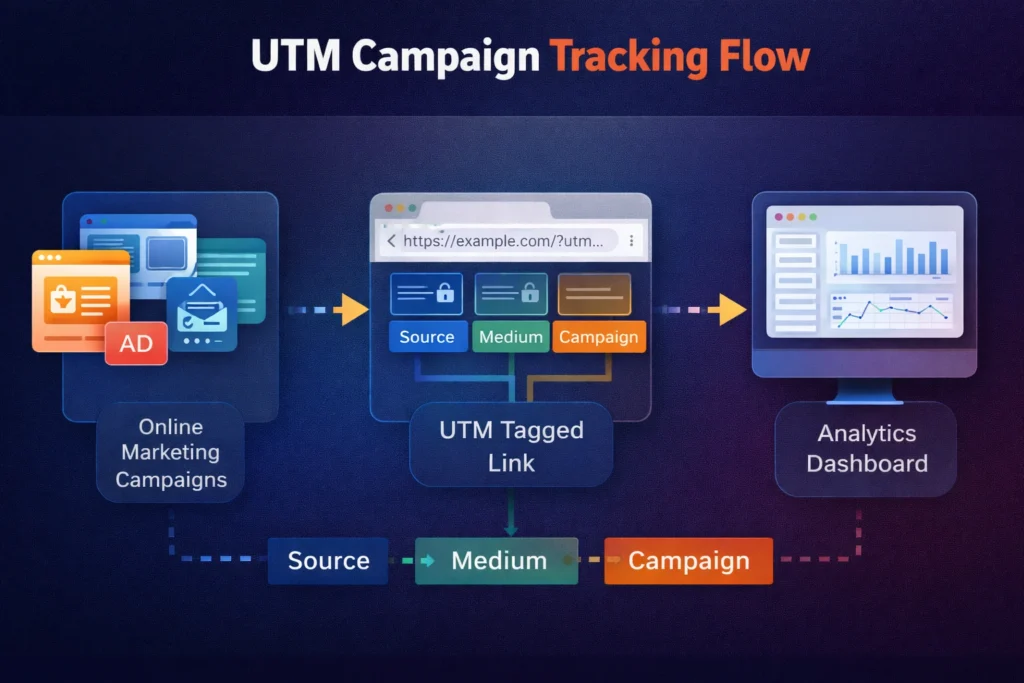
Marketing campaigns generate traffic from multiple digital channels such as social media platforms, email newsletters, paid advertising networks, influencer partnerships, and affiliate promotions. Each marketing channel sends visitors to a website, but analytics platforms cannot automatically identify which campaign generated that traffic when links contain no tracking parameters.
UTM links solve this attribution problem by attaching structured campaign parameters to URLs. These parameters communicate campaign metadata such as traffic source, marketing medium, and campaign name to analytics systems. When a user clicks a campaign link containing UTM parameters, analytics platforms record the metadata and attribute the visit to the correct marketing campaign.
This guide explains how to create UTM links for marketing campaigns, including parameter structure, examples of campaign URLs, and step-by-step instructions for generating campaign tracking links.
What Are UTM Links?
UTM links are URLs that contain campaign tracking parameters used to identify the source and context of website traffic in analytics platforms. The acronym UTM stands for Urchin Tracking Module, a tracking system originally developed for web analytics before the acquisition of Urchin Software by Google.
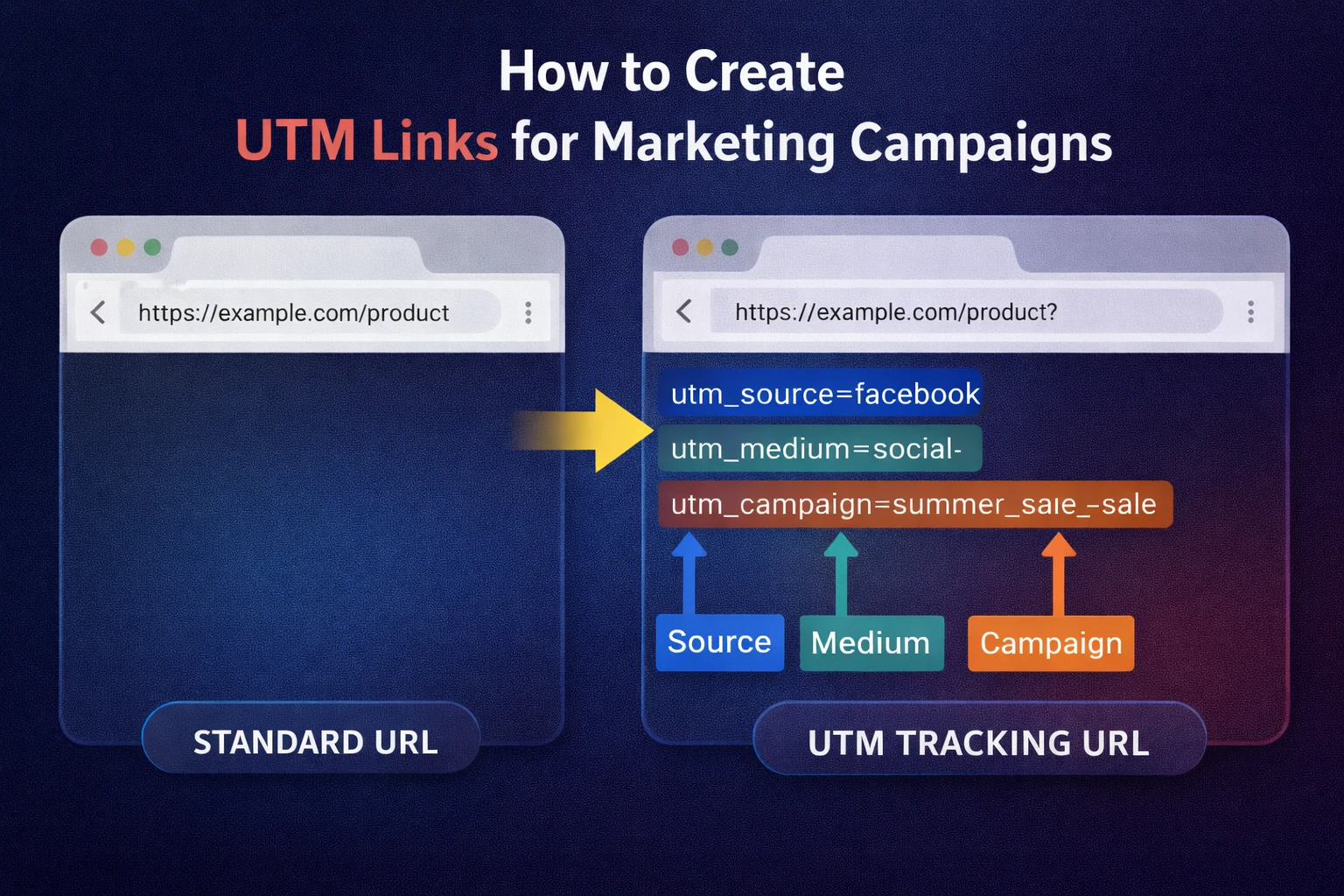
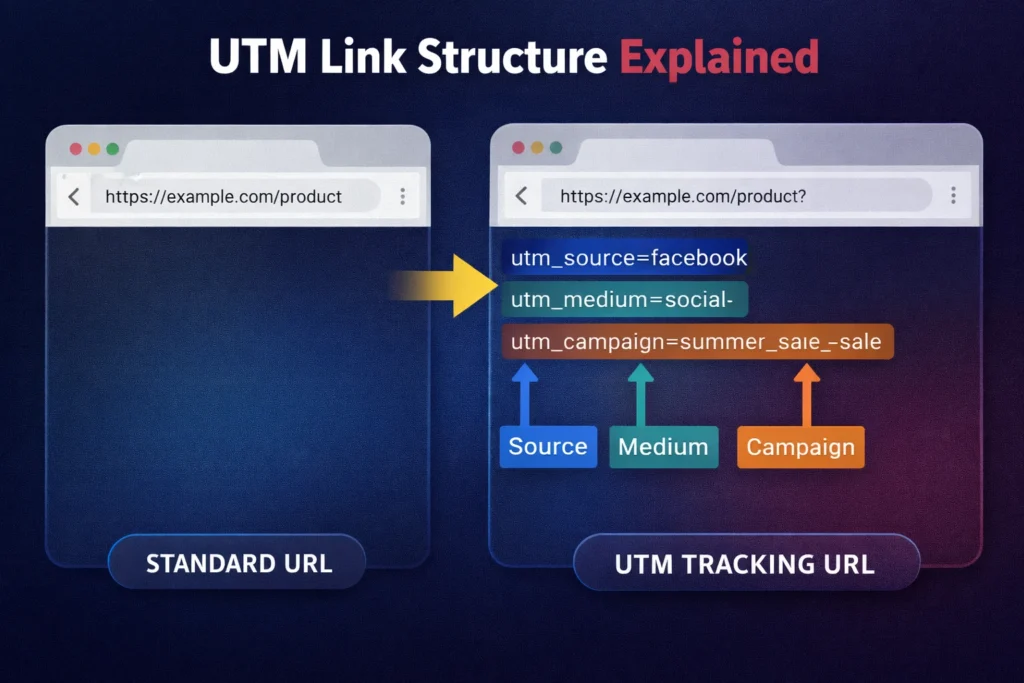
A standard webpage URL directs users to a webpage but does not provide campaign attribution data.
Example of a normal URL:
https://example.com/product
A UTM tracking link includes additional parameters that describe the marketing campaign responsible for generating the visit.
Example of a UTM tracking URL:
https://example.com/product?utm_source=facebook&utm_medium=social&utm_campaign=summer_sale
In this example:
- utm_source – identifies the platform sending traffic
- utm_medium – identifies the marketing channel
- utm_campaign – identifies the marketing campaign
When a user clicks this link, analytics platforms record the campaign parameters and categorize the visit accordingly. Marketing teams can then analyze which campaigns generate the highest traffic and conversion rates.
UTM links function as a campaign attribution system, allowing marketers to track the effectiveness of advertising campaigns across multiple marketing channels.
What Are the 5 UTM Parameters?
UTM parameters represent structured campaign attributes that describe the origin and context of marketing traffic. Each parameter communicates specific campaign information to analytics platforms.
| UTM Parameter | Campaign Attribute | Example Value | Purpose |
|---|---|---|---|
| utm_source | Traffic source | google, facebook, newsletter | Identifies the platform sending traffic |
| utm_medium | Marketing channel | email, social, cpc | Identifies the marketing channel |
| utm_campaign | Campaign name | summer_sale | Identifies the specific marketing campaign |
| utm_term | Paid keyword | running_shoes | Tracks keywords in paid search campaigns |
| utm_content | Ad variation | banner_ad_1 | Differentiates multiple ads or links |
The first three parameters — source, medium, and campaign — represent the core attributes used in most marketing campaigns.
Example campaign URL:
https://example.com/product?utm_source=instagram&utm_medium=social&utm_campaign=product_launch
Additional parameters such as utm_term and utm_content allow marketers to track advanced campaign attributes including paid keywords, banner variations, or multiple ad placements.
Why Marketing Campaigns Require UTM Tracking
Marketing campaigns require UTM tracking because traffic originates from multiple digital platforms. Analytics systems cannot automatically determine which campaign generated a website visit when URLs contain no tracking parameters.
UTM parameters improve marketing analytics in three primary ways.
Accurate Traffic Attribution
UTM parameters explicitly label the origin of website traffic by identifying the campaign source and marketing channel.
Example parameters:
utm_source=instagram
utm_medium=social
utm_campaign=product_launch
Analytics dashboards record the visit as traffic originating from Instagram social media under the product launch campaign.
Accurate attribution allows marketing teams to evaluate which campaigns generate the highest engagement and conversion rates.
Campaign Performance Comparison
Marketing teams often run campaigns simultaneously across multiple marketing channels. UTM tracking enables analysts to compare campaign performance across platforms.
Example campaign comparison:
| Platform | Website Visits | Conversions |
|---|---|---|
| Instagram Campaign | 4,100 | 220 |
| Facebook Campaign | 3,800 | 200 |
| Email Campaign | 1,950 | 260 |
Campaign comparison reveals which platform generates the highest conversion rate. Marketing managers use this information to allocate budgets to the most effective marketing channels.
Marketing Return on Investment Measurement
Campaign tracking allows marketers to connect advertising costs with revenue outcomes.
Example ROI comparison:
| Campaign | Advertising Cost | Revenue Generated |
|---|---|---|
| Social Media Campaign | $1,500 | $6,800 |
| Email Campaign | $300 | $4,100 |
Campaign ROI analysis becomes possible only when marketing traffic is accurately attributed using UTM parameters.
How to Create UTM Links for Marketing Campaigns
Creating UTM links involves attaching campaign tracking parameters to a destination URL so analytics systems can identify the marketing campaign responsible for generating website traffic.
Step 1: Choose the destination URL
Select the webpage where campaign visitors should land.
Example destination URL:
https://example.com/product
This URL represents the final page users will visit after clicking the campaign link.
Step 2: Define the campaign source
The utm_source parameter identifies the platform or website sending traffic to the campaign landing page.
Examples:
utm_source=facebook
utm_source=google
utm_source=newsletter
The source value should represent the exact platform responsible for distributing the campaign link.
Step 3: Define the marketing medium
The utm_medium parameter identifies the marketing channel used to distribute the campaign.
Examples:
utm_medium=social
utm_medium=email
utm_medium=cpc
The medium attribute helps analytics platforms categorize traffic according to marketing channel types.
Step 4: Define the campaign name
The utm_campaign parameter identifies the specific marketing campaign or promotional initiative.
Example:
utm_campaign=summer_sale
Campaign naming conventions should remain consistent across marketing campaigns to maintain organized analytics reports.
Step 5: Combine parameters into the final campaign URL
The campaign parameters are appended to the destination URL using query string syntax.
Example UTM campaign link:
https://example.com/product?utm_source=facebook&utm_medium=social&utm_campaign=summer_sale
When a visitor clicks the link, analytics platforms record the parameters and attribute the visit to the correct campaign.
How to Generate UTM Links Automatically
Manual creation of UTM links often introduces formatting errors or inconsistent parameter naming. Marketing teams frequently use automated tools to generate campaign tracking URLs quickly while maintaining consistent naming conventions.
You can generate campaign tracking URLs instantly using the TextToolz tool:
https://texttoolz.com/tools/utm-generator
The generator automatically:
- creates properly formatted campaign URLs
- prevents URL syntax errors
- generates copy-paste ready tracking links
- standardizes campaign parameters for analytics tracking
Automated UTM generators simplify campaign tracking workflows and ensure accurate analytics data across marketing campaigns.
Example of a UTM Tracking Link
A UTM tracking link is a standard URL that includes campaign parameters appended after the question mark symbol. These parameters identify the source, medium, and campaign responsible for generating the traffic. Analytics platforms read the parameters and store the campaign data inside marketing reports.
Example campaign parameters:
| Parameter | Value |
|---|---|
| utm_source | |
| utm_medium | social |
| utm_campaign | product_launch |
| utm_content | carousel_ad |
Generated tracking link:
https://example.com/product?utm_source=twitter&utm_medium=social&utm_campaign=product_launch&utm_content=carousel_ad
When a user clicks this link, analytics platforms categorize the visit as traffic from Twitter social media under the Product Launch campaign. Marketing analysts can then evaluate traffic behavior, conversions, and revenue associated with that campaign.
Campaign URLs with structured parameters provide clear marketing attribution, which allows marketers to understand how each promotional channel contributes to website performance.
UTM Naming Best Practices
UTM naming conventions determine how campaign data appears inside analytics dashboards. Consistent naming structures ensure that campaign traffic remains organized and easy to analyze. Inconsistent naming creates duplicate entries and fragmented marketing reports.
Several best practices help maintain accurate UTM campaign data.
Use lowercase parameter values
Analytics systems treat uppercase and lowercase values as different parameters. Using lowercase values prevents duplicate campaign records.
Correct example:
utm_source=facebook
Incorrect example:
utm_source=Facebook
utm_source=FACEBOOK
Both values create separate traffic sources inside analytics reports.
Use descriptive campaign names
Campaign names should clearly describe the promotion being tracked. Descriptive campaign names improve reporting clarity.
Example:
utm_campaign=black_friday_sale
Clear campaign naming helps analysts quickly identify which promotions generated traffic or conversions.
Avoid spaces in parameter values
Spaces inside URL parameters cause formatting issues and reduce readability. Replace spaces with underscores or hyphens.
Correct format:
utm_campaign=summer_sale
Incorrect format:
utm_campaign=summer sale
Using underscores ensures the URL remains valid and easy to interpret.
Maintain consistent campaign structure
Marketing teams benefit from standardized naming patterns across campaigns.
Example naming structure:
utm_source=instagram
utm_medium=social
utm_campaign=product_launch
Standardization ensures campaign reports remain structured and easy to analyze.
Common UTM Tracking Mistakes
Incorrect implementation of UTM parameters can lead to inaccurate analytics data. Several common mistakes reduce campaign attribution accuracy.
Using inconsistent parameter names
Different naming styles create duplicate campaign entries in analytics reports.
Example of inconsistent naming:
utm_source=facebook
utm_source=fb
utm_source=FacebookAds
Analytics systems interpret these as three separate traffic sources.
Forgetting campaign parameters
Campaign URLs missing core parameters such as utm_source or utm_medium reduce campaign tracking accuracy. Every marketing campaign link should include at least three parameters:
utm_source
utm_medium
utm_campaign
These parameters provide the minimum data required for campaign attribution.
Creating manually formatted URLs
Manually creating campaign URLs increases the risk of syntax errors or incorrect parameter placement. Automated tools reduce these errors by generating correctly formatted campaign links.
You can quickly generate structured campaign URLs using the TextToolz UTM Generator tool.
The generator creates properly formatted campaign URLs and eliminates manual formatting errors.
Advanced Campaign Tracking Strategies
Advanced campaign tracking strategies improve the quality of marketing analytics data. These strategies allow marketing teams to track detailed campaign variations across multiple channels.
Tracking ad variations with utm_content
The utm_content parameter distinguishes different advertisements or promotional links within the same campaign.
Example:
utm_campaign=summer_sale&utm_content=banner_ad
utm_campaign=summer_sale&utm_content=video_ad
Analytics platforms record which ad version generated more traffic or conversions.
Tracking paid keywords with utm_term
The utm_term parameter tracks the keywords used in paid search campaigns.
Example:
utm_source=google&utm_medium=cpc&utm_term=running_shoes
This parameter allows marketers to evaluate which keywords generate the most website traffic.
Tracking influencer marketing campaigns
Influencer marketing campaigns benefit from unique campaign parameters assigned to each influencer.
Example:
utm_source=instagram&utm_medium=influencer&utm_campaign=fitness_launch&utm_content=influencer_john
Analytics reports then show how much traffic each influencer generated.
Information Gain Insight: Why UTM Consistency Improves Marketing Analytics
Marketing analytics platforms treat each parameter value as a unique campaign identifier. When marketing teams use inconsistent naming structures, campaign data becomes fragmented across multiple reporting categories.
For example, the campaign values summer_sale, SummerSale, and summer-sale appear as three separate campaigns inside analytics dashboards. Analysts must manually merge or interpret these datasets to evaluate campaign performance.
Organizations that maintain standardized UTM naming conventions experience more reliable marketing reports and faster campaign analysis. Standardized parameters allow analysts to compare campaign results across marketing channels without manually reorganizing campaign data.