About the Skyrim Name Generator
A Skyrim name belongs to a race, and the ten races run four different kinds of second name, and five of them run none at all. This generator carries all ten, decomposes a name wherever the name decomposes, and adds a second layer nobody else offers: the dragon language, built from the 69 words the game translates out loud in its own shouts and dragon names. Every result is checked against a block-list of 101 characters and dragons who already exist in the game before it is shown to you.
What is a Skyrim name made of?
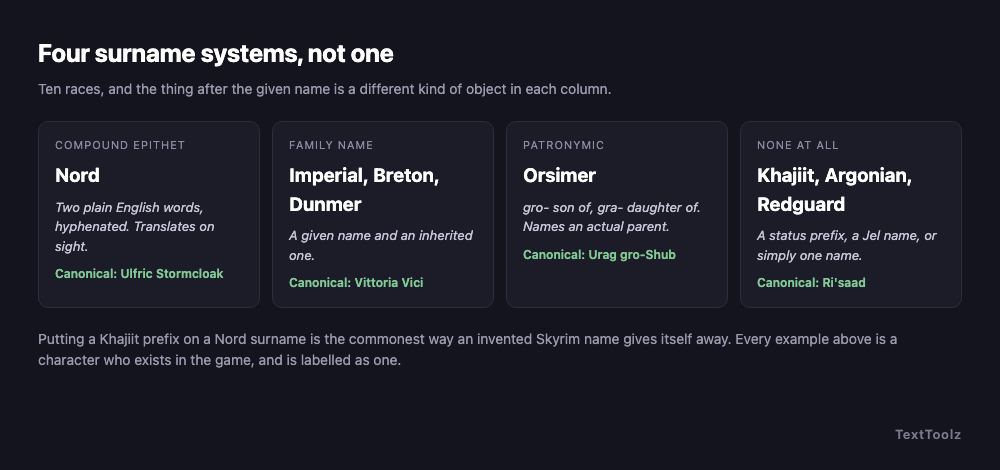
A Skyrim name is a given name plus, depending on race, one of four completely different things. A compound epithet, if you are a Nord. A family name, if you are an Imperial, a Breton or a Dunmer. A patronymic naming your father or mother, if you are an Orc. Or no second name at all, if you are a High Elf, a Wood Elf, a Khajiit, an Argonian or most Redguards, which is five of the ten races.
Two of those four translate on sight. Battle-Born is battle plus born. Shatter-Shield is shatter plus shield. Urag gro-Shub is Urag, son of Shub. That is the whole meaning, and a generator that hands you a Nord compound without telling you what its two words are has decided to describe the weather instead of reading the name.
What naming system does each Skyrim race use?
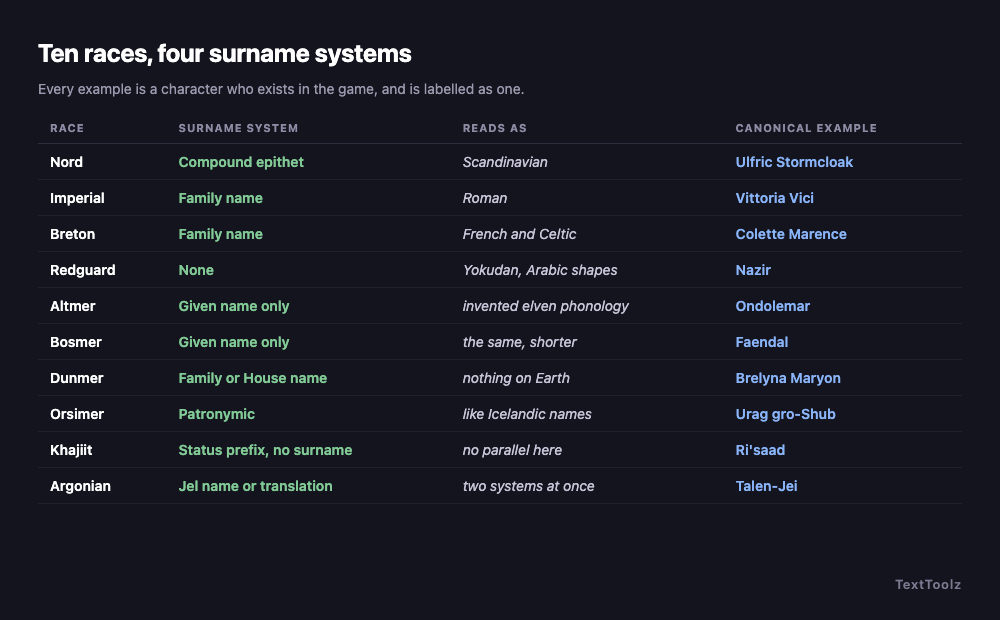
Ten races, four kinds of second name, and each race also reads as a different real-world linguistic tradition. The table's system column is finer than that four-way split, because it names what each race carries rather than which bucket it sits in. Nords read Scandinavian, Imperials Roman, Bretons French and Celtic, Redguards Yokudan with Arabic shapes, and the three Mer races each get an invented phonology of their own. The table gives every race its system, its parallel, and a character from the game, marked as canonical so it cannot be mistaken for output.
| Race | Surname system | Reads as | Canonical example | What the generator builds |
|---|---|---|---|---|
| Nord | Compound epithet | Scandinavian | Ulfric Stormcloak | Given name plus two plain English words, hyphenated |
| Imperial | Family name | Roman | Vittoria Vici | Given name plus a Roman-style family name |
| Breton | Family name | French and Celtic | Colette Marence | Given name plus a family name that could sit on a French map |
| Redguard | One name, no surname | Yokudan, with Arabic shapes | Nazir | Usually a single name and nothing after it |
| Altmer (High Elf) | Given name only | an invented elven phonology | Ondolemar | Long, vowel-heavy, no family name |
| Bosmer (Wood Elf) | Given name only | the same phonology, shorter | Faendal | Shorter and rougher than High Elf, still no family name |
| Dunmer (Dark Elf) | Family or House name | nothing on Earth, which is the point | Brelyna Maryon | Given name plus a family or Great House name |
| Orsimer (Orc) | Patronymic naming a parent | a patronymic, like Icelandic names | Urag gro-Shub | Given name, gro- or gra-, then the parent |
| Khajiit | Status prefix, no surname | a prefix system with no parallel here | Ri'saad | Prefix, apostrophe, name. Or no prefix at all |
| Argonian | Jel name or its translation | two systems running at once | Talen-Jei | Either the Jel name or the translated descriptive one |
This split is not a finding of ours and it is not claimed as one. The best generator competing for this search sets it out correctly, calls it ten races and ten naming systems, and cites its sources for the Khajiit and Argonian conventions. That page is good, and the useful thing to say about it is where its output stops matching its own prose, which is the subject of the two sections below.
How do you read a Khajiit name?
Split it at the apostrophe and it stops being decoration. The piece in front is a claim about standing; the piece behind it is the name. J'zargo is a young Khajiit called Zargo. Ri'saad, who runs a trading caravan, is carrying his rank in front of his name before he has said a word.
| Prefix | Marks | Example |
|---|---|---|
| Ri' | a leader, or the head of a caravan | Ri'saad, a caravan leader |
| Ra' | a leader, used the same way as Ri | Ra'kheran |
| Ja' | a youth | J'zargo, a College student |
| Ji' | a youth, used the same way as Ja | Ji'dar |
| Ma' | a child | Ma'dran, a fence in Riften |
| M' | a child, elided before a vowel | M'aiq |
A great many Khajiit carry no prefix at all, and the generator produces those too: Kharjo, Ahkari and Zaid are all characters in the game with bare names. A generator that puts a prefix on every Khajiit is claiming that every Khajiit in Skyrim is a caravan leader or a child.
What do gro- and gra- actually mean in an Orc name?
Son of, and daughter of. Urag gro-Shub is Urag, son of Shub. Ghorza gra-Bagol is Ghorza, daughter of Bagol. It is the same shape Icelandic names still use, and it means the second half of an Orc name is not a family name at all: it is one specific parent, and it changes every generation.
That has a consequence no other generator acts on. If the affix names a parent, then two Orcs sharing a parent are siblings, and a batch of names ought to be able to produce a family. The best competing generator explains the affix correctly and then draws the parent at random on every result, so no two names it produces are ever related to each other. Tick Generate an Orc family above and every name in the batch shares one parent, which is what the convention is actually for.
How do Argonian names work?
Two systems at once. An Argonian has a Jel name, which is their own: Talen-Jei, Shahvee, Derkeethus, Wujeeta. They also have a translated name, which is what everybody else calls them, and that is where the long descriptive ones come from: Scouts-Many-Marshes, Counts-the-Waves. Both are correct, and the generator says which shape it produced.
The translated form is also, cheerfully, why Argonians get the best joke names. A player in the r/skyrim naming thread reports an Argonian called Moves-Like-Jagger, which is built exactly the way Scouts-Many-Marshes is built. That is not a mistake in the convention; it is the convention working as designed on a different input.
Can you name your Skyrim character in the dragon language?
Yes, and it is the one naming method on this page that nothing else competing for this search offers. The idea is not ours either. A player in the r/skyrim thread that ranks for this query describes it plainly: "I'll use an English to Dragon dictionary and pick a word that defines my character. For example I named one of my pure mage characters Kro." Another names a character Dilos Zun and glosses it "Lethal Weapon".
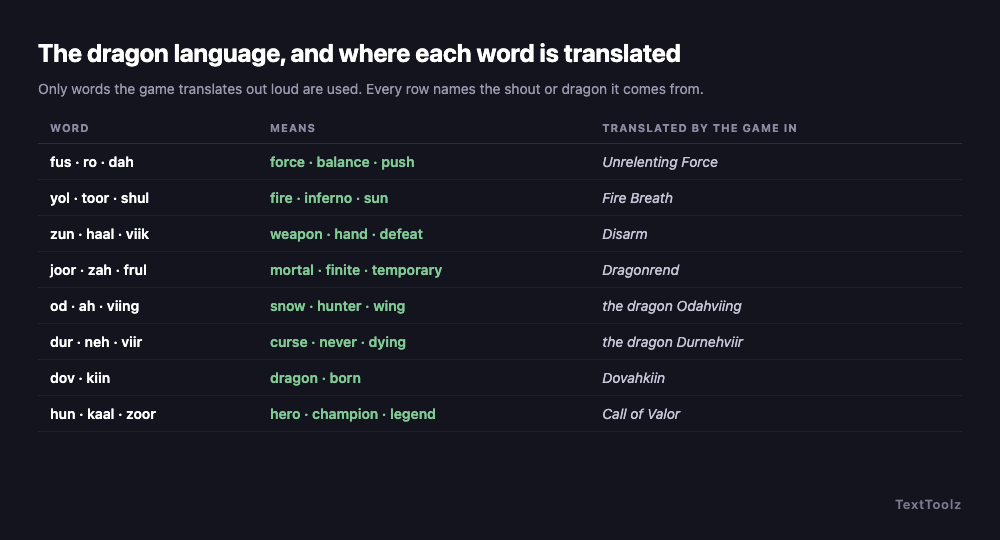
The constraint this generator puts on itself is the interesting part. Large fan-compiled dragon dictionaries exist. None of them is used here. The only words in the bank are the ones the game translates out loud itself, in its shouts and in the names of its dragons: Fus Ro Dah is force, balance, push. Zun Haal Viik is weapon, hand, defeat. Odahviing is snow, hunter, wing. Dovahkiin is dragon, born. That gives 69 words whose meanings can be checked against the game rather than against somebody else's wiki, and every dragon-language name here prints its words, their meanings, and the shout each came from.
| Words | What they mean | Translated by the game in |
|---|---|---|
| fus, ro, dah | force, balance, push | Unrelenting Force |
| yol, toor, shul | fire, inferno, sun | Fire Breath |
| fo, krah, diin | frost, cold, freeze | Frost Breath |
| zun, haal, viik | weapon, hand, defeat | Disarm |
| joor, zah, frul | mortal, finite, temporary | Dragonrend |
| laas, yah, nir | life, seek, hunt | Aura Whisper |
| hun, kaal, zoor | hero, champion, legend | Call of Valor |
| od, ah, viing | snow, hunter, wing | the dragon Odahviing |
| dur, neh, viir | curse, never, dying | the dragon Durnehviir |
| dov, kiin | dragon, born | Dovahkiin |
Does your Skyrim name already belong to someone in the game?
Every name this generator produces is checked against a block-list of 101 characters and dragons before you see it, and this check exists because the best competitor on this search fails it.
Read live on 2026-09-17, one batch of five names from the generator ranking third for this query returned Scouts-Many-Marshes, described as "a rare Argonian scout known for navigating treacherous wetlands". Scouts-Many-Marshes is a character in Skyrim, and that same page's own table, further down, lists him as a canonical NPC. The same batch returned Ghorza gra-Dushnakh, where Ghorza gra-Bagol is a canonical blacksmith. A generator that hands back a name from the game as though it invented it will eventually hand you Ulfric.
The limit here is stated rather than hidden. The block-list covers the named characters, clans and dragons this page carries, and it is not every name in the game. It is worth knowing that the generator can assemble Battle-Born out of its own two word pools, and that the check is what stops it reaching you.
What breaks immersion in a Skyrim name?
Treating the ten races as one pool. Almost every bad invented Skyrim name comes from borrowing a piece of one system and bolting it onto another: a Khajiit prefix on a Nord compound, an Argonian-shaped hyphenated name on a Khajiit, a family name on a race that has never had one.
The forum pass supplies a real instance rather than a hypothetical. A player listing their characters by race gives their Khajiit a two-part hyphenated name, which is the Argonian translated form rather than the Khajiit prefix form. They were trying to be lore-friendly and used the wrong system, which is the clearest argument there is for printing the convention next to the output instead of just the name.
The other test turns up on every naming page worth reading, and according to the competing guide that ranks third for this query it is the one to finish on: say it out loud before you commit. A dragon-language name looks superb written down and has to survive being read back by somebody else.
60 Skyrim names, decomposed where they decompose
Sixty names from this generator's own pools, grouped by race. Nord compounds and Orc patronymics are decomposed into their parts, Khajiit rows name the prefix used, dragon-language rows carry the meaning of each word, and the rows that genuinely do not decompose say so instead of being handed a mood. None of these is a character who exists in the game.
| Name | Race | What it decomposes to |
|---|---|---|
| Torgrim Ash-Heart | Nord | ash plus heart |
| Ragnvald Frost-Wind | Nord | frost plus wind |
| Signy Raven-Breaker | Nord | raven plus breaker |
| Brynjar Oath-Sworn | Nord | oath plus sworn |
| Solveig Winter-Watch | Nord | winter plus watch |
| Hrothgar Stone-Blade | Nord | stone plus blade |
| Yrsa Bright-Song | Nord | bright plus song |
| Hakon Grim-Crag | Nord | grim plus crag |
| Molgak gro-Burol | Orsimer (Orc) | Molgak, son of Burol |
| Grazna gra-Mor | Orsimer (Orc) | Grazna, daughter of Mor |
| Ghartok gro-Largash | Orsimer (Orc) | Ghartok, son of Largash |
| Zubeta gra-Khazgur | Orsimer (Orc) | Zubeta, daughter of Khazgur |
| Uglarz gro-Uzgar | Orsimer (Orc) | Uglarz, son of Uzgar |
| Orbula gra-Mashul | Orsimer (Orc) | Orbula, daughter of Mashul |
| Ri'Vashir | Khajiit | the Ri prefix marks a leader |
| Ja'Teko | Khajiit | the Ja prefix marks a youth |
| Ma'Kesh | Khajiit | the Ma prefix marks a child |
| Ji'Hadir | Khajiit | the Ji prefix marks a youth |
| Ra'Sarid | Khajiit | the Ra prefix marks a leader |
| Kalo | Khajiit | no prefix, and no claim to standing |
| Mirri | Khajiit | no prefix, and no claim to standing |
| Swims-Beneath-Currents | Argonian | the translated name, not the Jel one |
| Counts-The-Reeds | Argonian | the translated name, not the Jel one |
| Speaks-In-Silence | Argonian | the translated name, not the Jel one |
| Guards-Against-Storms | Argonian | the translated name, not the Jel one |
| Weaves-Many-Roots | Argonian | the translated name, not the Jel one |
| Teeba | Argonian | a Jel name, untranslated |
| Ukaza | Argonian | a Jel name, untranslated |
| Heeja | Argonian | a Jel name, untranslated |
| Nelros Savil | Dunmer (Dark Elf) | given name plus a family name |
| Aryni Hlervu | Dunmer (Dark Elf) | given name plus a family name |
| Dravos Andrano | Dunmer (Dark Elf) | given name plus a family name |
| Velyna Dreloth | Dunmer (Dark Elf) | given name plus a family name |
| Therin Arano | Dunmer (Dark Elf) | given name plus a family name |
| Aurelia Rufinus | Imperial | given name plus a Roman-style family name |
| Cassian Metellus | Imperial | given name plus a Roman-style family name |
| Octavia Naevius | Imperial | given name plus a Roman-style family name |
| Decimus Volusian | Imperial | given name plus a Roman-style family name |
| Junia Tarquinus | Imperial | given name plus a Roman-style family name |
| Meryn Delaronde | Breton | given name plus a family name |
| Elodie Vaugrin | Breton | given name plus a family name |
| Jourdain Beaufort | Breton | given name plus a family name |
| Sylvaine Montclair | Breton | given name plus a family name |
| Rashid | Redguard | one name, no surname |
| Amira | Redguard | one name, no surname |
| Zabir | Redguard | one name, no surname |
| Nadira | Redguard | one name, no surname |
| Calanon | Altmer (High Elf) | one name, no surname |
| Faeloria | Altmer (High Elf) | one name, no surname |
| Miraldor | Altmer (High Elf) | one name, no surname |
| Lirandel | Altmer (High Elf) | one name, no surname |
| Athragar | Bosmer (Wood Elf) | one name, no surname |
| Maerwen | Bosmer (Wood Elf) | one name, no surname |
| Torendil | Bosmer (Wood Elf) | one name, no surname |
| Nivale | Bosmer (Wood Elf) | one name, no surname |
| Yolviing | Dragon language | fire, wing |
| Krahdiin | Dragon language | cold, freeze |
| Grahzoor | Dragon language | battle, legend |
| Laasnirgut | Dragon language | life, hunt, far |
| Qahtiid | Dragon language | armour, time |
Why is my Skyrim character called Prisoner?
Because the opening sequence calls everybody prisoner before a name is ever entered. A player who skips through the cart ride and the character creator keeps that as their working identity, and Google's own summary of the r/skyrim naming thread notes that players regularly "accidentally end up named 'Prisoner' by rushing through the opening sequence". It is the cheapest possible argument for choosing a name before you start rather than during the first quest.
Where do these Skyrim names come from?
The race conventions follow the naming systems the games use and the community references document, and the generator ranking third for this query deserves credit for setting the ten-system split out correctly and citing its sources for the Khajiit and Argonian rules. It is named here by argument rather than by link. Every character given as a canonical example on this page is a character in the game, and is labelled as canonical wherever it appears, which is a distinction Google's own AI Overview for this query does not make: it lists Brunwulf Free-Winter and Neloth, who exist, alongside Hjallmar Stone-Crag and S'Khaj-Do, who do not.
The dragon-language words come only from the game's own translations, and the page prints the shout or the dragon that supplies each one. No fan-compiled dictionary is used, because a gloss that cannot be checked is worth nothing.
What is invented here is the given-name pools, which are written to each race's pattern rather than lifted from the game, because lifting them is how a generator ends up returning a character who already exists. That is a deliberate choice and it is labelled rather than presented as canon.
Everything runs in your browser. No name is sent anywhere, the generator keeps working with the network disconnected, and nothing you generate or copy is logged. The Elder Scrolls and Skyrim are trademarks of ZeniMax Media and Bethesda Softworks; TextToolz is not affiliated with or endorsed by either.
Other name generators
The D&D name generator runs the same argument for tabletop races, and the Sith name generator builds every name out of a real word and shows which one. For the map your character walks across, the city name generator and the country name generator decompose their output the same way this one does.